constructionContractorThe CRM built for general contractors
General contractor CRM that gives every bid a next step
Catch every bid request and inquiry, tie walkthroughs and scope discussions to one opportunity, follow up each proposal until it is decided, and schedule subs and crews from the same system.
Website form. Assigned to the estimator instantly.
verified
Proposal won
Kitchen and addition. Sent to scheduling.
Works with the tools your office already uses
Facebook Lead Ads
Google Ads
LinkedIn
WhatsApp
Twilio
Gmail
Outlook
Calendly
Stripe
QuickBooks
Google Drive
Google Forms
Slack
Google Meet
DocuSign
Dropbox
Facebook Lead Ads
Google Ads
LinkedIn
WhatsApp
Twilio
Gmail
Outlook
Calendly
Stripe
QuickBooks
Google Drive
Google Forms
Slack
Google Meet
DocuSign
Dropbox
A bid is only won if someone follows it up
A single project can involve a site walk, a scope change, a revised number and a client who also asked two other builders. Notes sit in email threads and on the estimator's phone, so when a proposal goes quiet nobody notices until the client has signed with someone else.
Arches CRM keeps the bid request, walkthrough, scope notes and proposal on one opportunity with an owner and a dated task. Managers see which bids are stalled after the site visit, and awarded projects move to the dispatch board without retyping.
One workspace from bid request to final walkthrough.
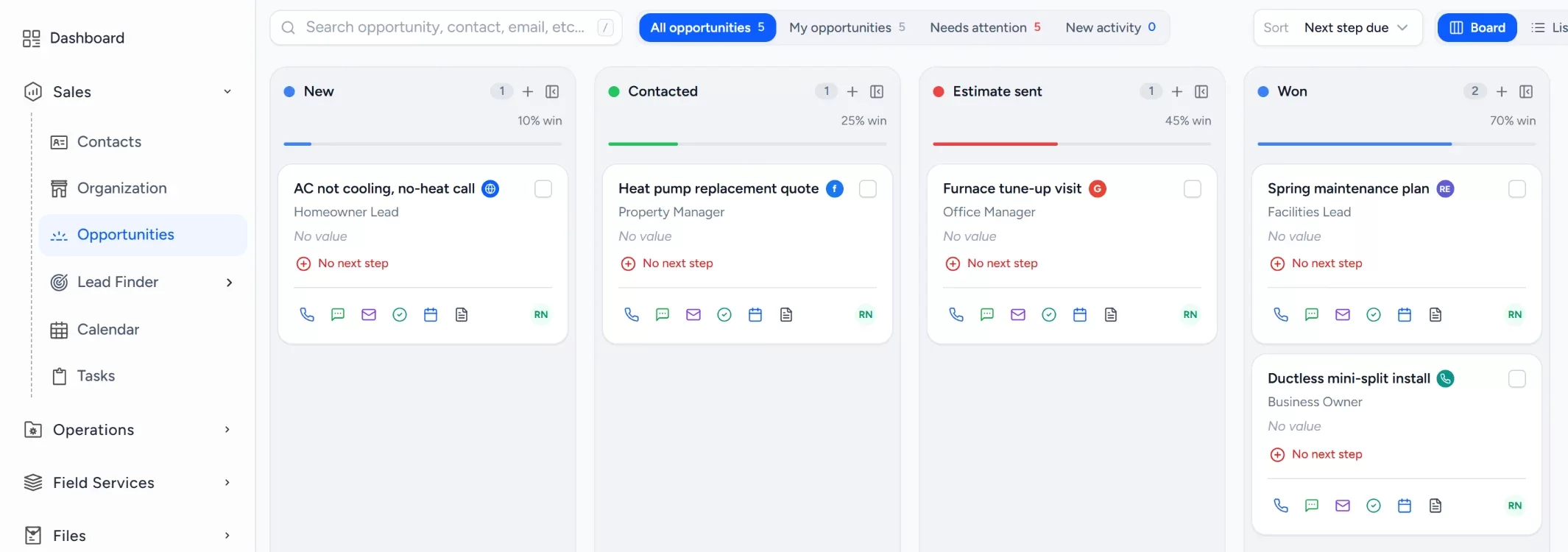
Sales pipeline
Every bid and proposal by stage
Move opportunities from bid request to awarded. Each card shows value, source, owner and one-tap call, email and WhatsApp.
checkStage totals and win probability at a glance
checkLead source on every opportunity
checkLost reasons tracked so you know what to fix
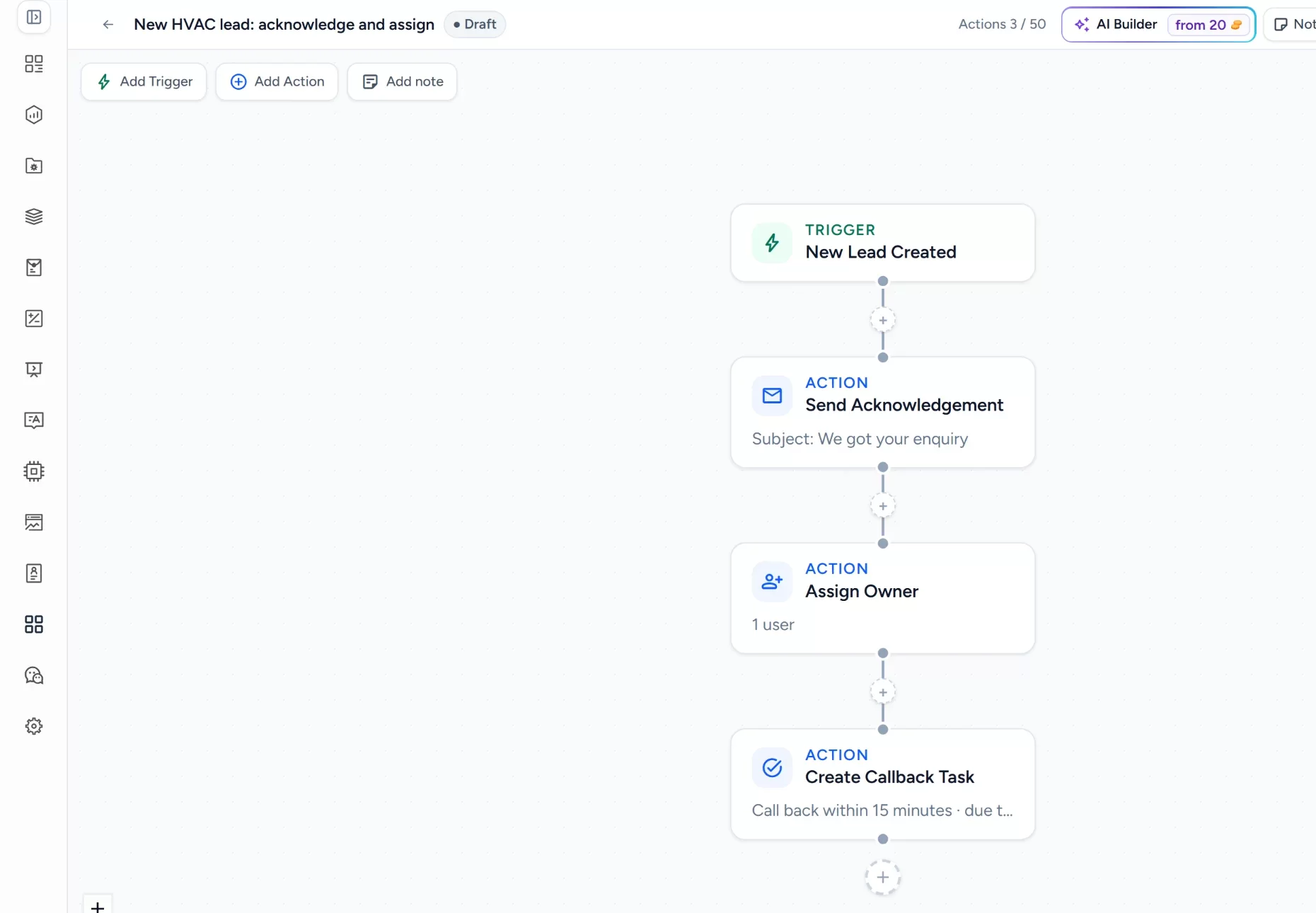
Automation
Every bid request answered and assigned
A workflow acknowledges each new request, assigns an estimator and creates a site visit task the moment it arrives. Build it once, test it as a draft, then publish.
checkTriggers for new leads and stage changes
checkActions for replies, owners and tasks
checkDraft and test before it goes live
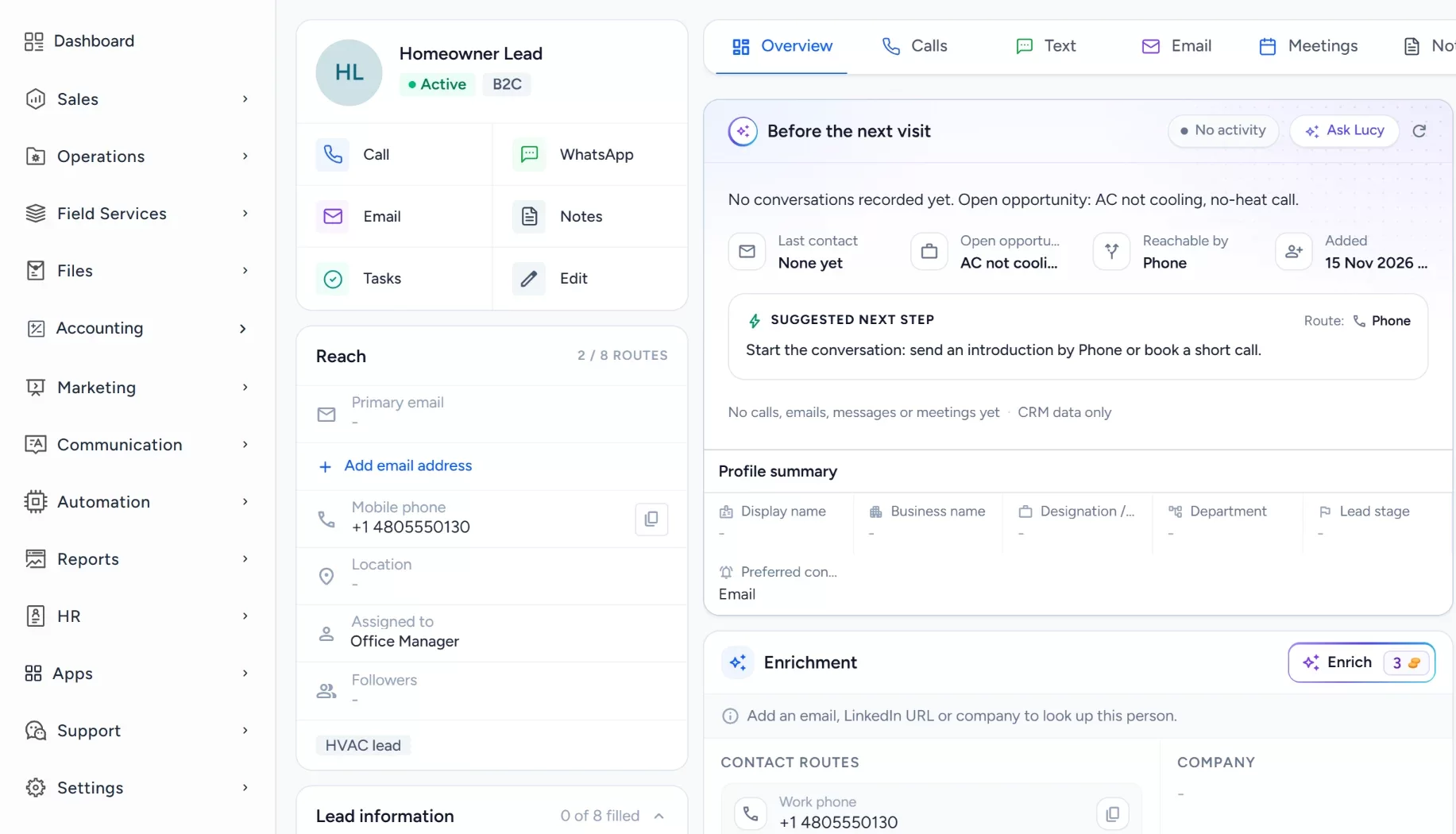
Customer record
The whole client history, one screen
Calls, emails, drawings, contracts, appointments and tasks sit on the contact, so anyone can pick up where someone left off.
checkAppointments and tasks next to the conversation
checkCall, WhatsApp and email from the record
checkProposals and documents attached
How it works for contractor teams
From bid request to booked build
Bid invitations, walkthroughs, proposals and sub schedules sit in one place, so no project waits on a forgotten email.
inputLeads and messages come in from
webWebsite form
Gmail
Outlook
callPhone calls
handshakeReferrals
LinkedIn
south
1gavelBid request loggedAn invitation or inquiry becomes an opportunity with an estimator assigned and a due date task.
task_altTasks
boltWorkflows
2videocamWalkthrough scheduledThe estimator sets a site walk or a video call, and the client gets a calendar invite.
Google Meet
calendar_monthCalendar
3descriptionProposal sentThe proposal goes out from the record, with plans and scope files attached from shared storage.
request_quoteEstimates
Dropbox
4forumFollow-up until decidedReminders and messages keep going until the client says yes or no, and the loss reason is noted.
task_altTasks
Gmail
5calendar_monthSubs and crews scheduledA won project is placed on the dispatch board, with each sub and crew on their own row.
local_shippingDispatch board
calendar_monthCalendar
receipt_longInvoices
handshakeProject won and on the calendarThe client file holds every email, proposal and call, ready for change orders and the warranty call.
Pick a job type to see exactly how Arches handles it, from the first request to the warranty call.
Contractor bid response
Every bid request answered before the deadline matters
A bid invitation or web inquiry is marked hot and assigned to an estimator the moment it arrives, so a person is on it while the owner is still deciding who to call.
Each proposal is an opportunity with a value, an owner and dated follow-ups. Workflows send the check-ins until the client decides, then the first invoice goes out and you see the moment it is paid.
YBYour general contracting businessEstimate from Arches CRM
ESTIMATENov 10, 2026
Prepared for Homeowner, Single-family homeOwner Estimator
Item
Detail
Kitchen remodel, cabinets and counters
Selected
Addition framing and roof
Included
Electrical and plumbing rough-in
Included
Permits and project management
Included
Status
Accepted
Accepted by Homeowner, Nov 12Invoice sent
PAID
sendProposal sentNov 10, 9:12 AM
callFollow-up call by the estimatorNov 11, automatic task
Put inspections, material orders and client sign-offs on the calendar as tasks with an owner, so a missed milestone shows up before it delays the next trade.
Mon 108:00Permit inspection2:00Order cabinets
Tue 1110:00Framing walkthrough
Wed 129:00Client selections1:00Sub schedule check
Thu 1311:00Rough-in inspection
Fri 143:00Draw request
Reach the customer from the visit:callCallsmsTextmailEmailchatWhatsApp
Tag finished projects and set reminders for the 30-day, 6-month and 11-month check-ins, so warranty items are found by you first, and past clients think of you for the next job.
KRKitchen remodel1 year warranty6-month check in 14 days
BRBathroom remodel1 year warranty30-day check-in sent
DPDeck and porch1 year warranty11-month visit booked
BFBasement finish1 year warrantyWarranty ends in 30 days
Arches keeps you organized. Lucy tells you what to do next.
Lucy shows you which proposals have gone quiet and which clients are waiting on an answer, so no bid sits forgotten.
Ask Lucy things like:
chat_bubbleWhich bids have stalled after the site visit?
chat_bubbleWhich clients are waiting for an answer?
chat_bubbleWhat tasks are overdue this week?
verified_userLucy only sees what you are allowed to see. She drafts emails and texts and suggests tasks, and nothing reaches a customer until you approve it. Lucy uses the AI credits included with your plan. See plans
Which bids have stalled after the site visit?
L
Lucy
3 proposals have no reply. The addition proposal was sent 6 days ago and the client opened it twice. The office proposal was sent 9 days ago and has not been opened.
The third is a bathroom proposal sent 4 days ago.
Would you like me to draft a follow-up for you to review?
Set up this general contracting workflow in your own account.
Build a bid pipeline with stages such as new, site visit, proposal sent and awarded, and add your estimators as owners. Enter the bids you are chasing now, give each one a dated follow-up task, and set up one workflow that assigns an estimator and creates the site visit task. Once awarded projects flow to the dispatch board cleanly, add milestone tasks and warranty check-ins.
Works alongside your tools
Keep your estimating, scheduling and accounting software where it already earns its place. Arches connects Gmail and Outlook for bid correspondence, Dropbox for plans and scope files, and Google Meet for video walkthroughs, so the client conversation and the paperwork stay on one record.
What are missed bids costing you?
Drag the sliders to your own numbers. Plain arithmetic, nothing hidden. For a wider view, try the lead cost calculator.
An estimate from the numbers you enter, not a promised result: leads x share never followed up x close rate x job value x 12. Change the sliders to match your business.
Why contractors switch to Arches
Everything the estimators and the field team need, in one system, without enterprise pricing or weeks of setup. See how Arches compares with Salesforce and Pipedrive.
Arches CRM compared with phones and spreadsheets and with complex CRM platforms
What your office needs
Arches CRMEverything in one CRM
Phones and spreadsheets
Complex CRMs
Web, email and ad leads capturedNo copy-paste from inboxes
check_circleAutomatic
cancelCopy-paste
do_not_disturb_onPaid add-on
WhatsApp, SMS and email in one inboxShared with the whole office
check_circleBuilt in
cancelPersonal phones
do_not_disturb_onOften extra
Automated proposal follow-upWorkflows run until a decision
check_circleBuilt in
cancelFrom memory
do_not_disturb_onHigher tiers
Sub and crew schedulingAwarded jobs go straight to the board
check_circleBuilt in
cancelSeparate tools
do_not_disturb_onSeparate product
Time to get startedFrom sign-up to first lead
check_circleMinutes
cancelNo real system
do_not_disturb_onWeeks
No lock-in contractCancel anytime
check_circleYes
cancelFree, but bids slip
do_not_disturb_onAnnual contracts
Some features depend on your plan, and you can try Arches CRM free for 7 days. Compare plans
CRM for general contractors questions
Reviewed by the Arches CRM team. Updated 15 November 2026.
It is software that keeps every client, bid, proposal and conversation in one shared record, so the team knows who owns each opportunity and what happens next. Our guide to CRM covers the basics.
Can it schedule subcontractors and crews?add
Yes. Arches includes a dispatch board and calendar for field service, so you can see each crew and sub across the week and move jobs between them.
How does it help with proposal follow-up?add
Each proposal becomes an opportunity with an owner and a dated follow-up task. Workflows send reminders and check-ins, so open bids stay visible until the client decides.
Can Lucy follow up with clients for us?add
Lucy can find proposals that have gone quiet and draft the follow-up. You review and approve each message, and nothing reaches a client until you do. Our construction CRM page covers the wider picture.
Does Arches CRM replace our industry software?add
Not necessarily. Keep your estimating, takeoff or accounting tools. Arches handles bids, client history, follow-up and crew scheduling, and connects to the tools it supports.
How much does Arches CRM cost?add
Plans are priced per user per month with no lock-in. See pricing for the details.
Every bid, answered first.
Run this month's bid requests through Arches for seven days and see how many more projects you win.

 Log in
 Start Free Trial