
 Log in
 Start Free Trial
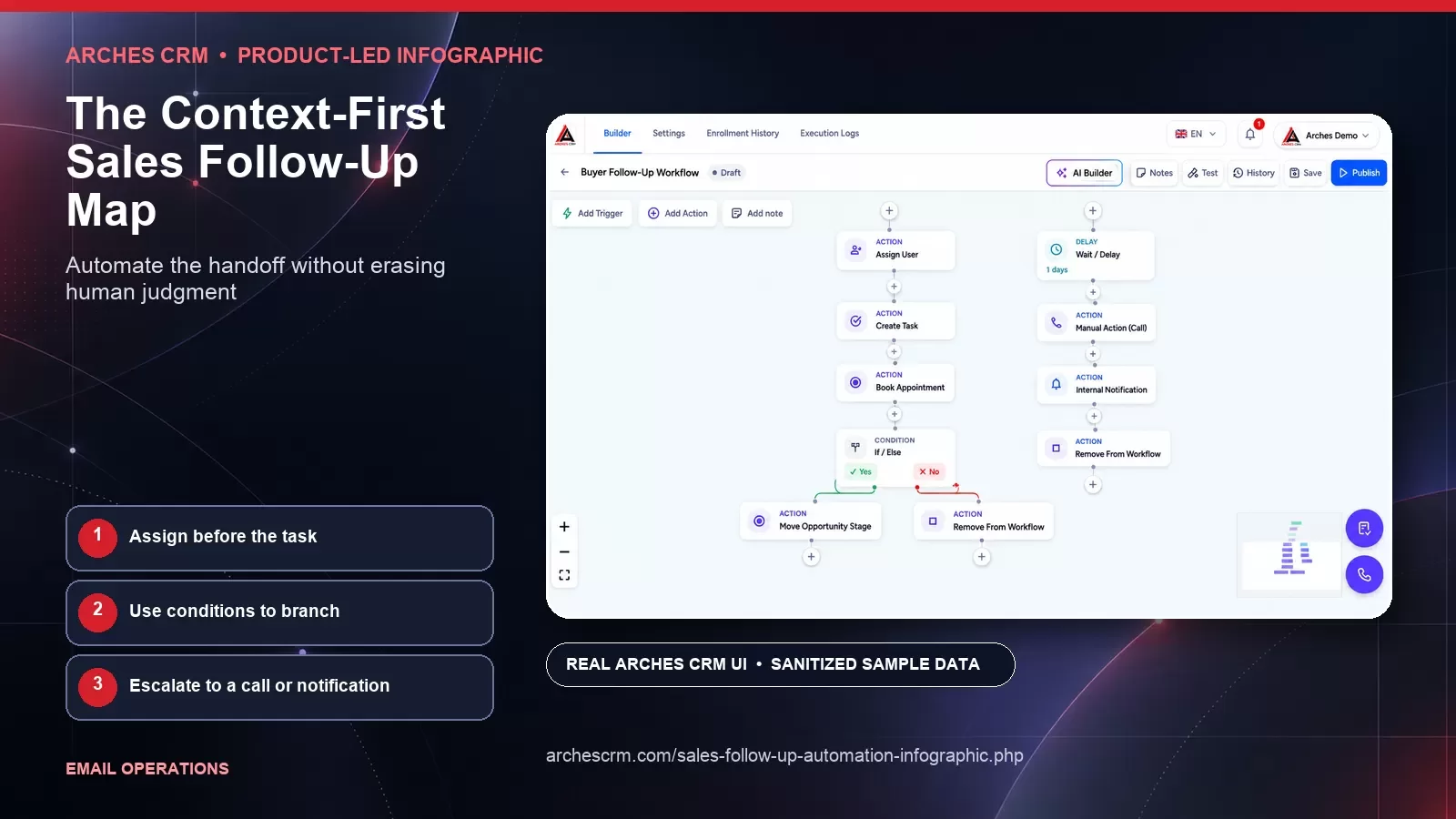
Automate the handoff without erasing human judgment
Automate follow-up while keeping human review points. These authentic Arches CRM application views use sanitized synthetic sample data and are specific to this workflow — not a repeated generic screenshot set.


Assign before the task
Use conditions to branch
Escalate to a call or notification
Why this framework matters
Timely response matters only when the trigger is reliable and the message is appropriate. A rapid but irrelevant email can be worse than a thoughtful delay. Teams need to verify the event, apply permission and suppression rules, select useful context, and decide whether automation or a human is the right responder.
Real-time programs can amplify data errors, duplicate messages, and poorly timed outreach. They can also create an experience that feels surveillant when the reason for contact is hidden. A controlled workflow balances speed with relevance, frequency, ownership, and the recipient's ability to choose what happens next.
Fast follow-up remains respectful when context and recipient control come first
Swipe or scroll to view the full diagram.
Read the infographic transcript
- Use a legitimate trigger: Confirm the event occurred, belongs to the correct person, and justifies the planned response under the relationship, permission, and applicable rules.
- Use minimum necessary data: Select only the context required to answer the request or make the response relevant. Avoid exposing hidden tracking details or unsupported intent claims.
- Respect the preferred channel: Respond through the channel the person chose or reasonably expects. Obtain any additional permission before expanding to another channel.
- Control frequency: Account for recent messages, overlapping programs, customer status, quiet periods, and unresolved issues before scheduling another contact.
- Route to a human: Send nuanced, urgent, service, or high-intent requests to an accountable person with the original context and a clear fallback if no owner is available.
- Make opt-out easy: Provide an understandable preference or opt-out route, apply the choice promptly across connected tools, and never make a person repeat the request.
Work through the framework
Use a legitimate trigger
Confirm the event occurred, belongs to the correct person, and justifies the planned response under the relationship, permission, and applicable rules.
Use minimum necessary data
Select only the context required to answer the request or make the response relevant. Avoid exposing hidden tracking details or unsupported intent claims.
Respect the preferred channel
Respond through the channel the person chose or reasonably expects. Obtain any additional permission before expanding to another channel.
Control frequency
Account for recent messages, overlapping programs, customer status, quiet periods, and unresolved issues before scheduling another contact.
Route to a human
Send nuanced, urgent, service, or high-intent requests to an accountable person with the original context and a clear fallback if no owner is available.
Make opt-out easy
Provide an understandable preference or opt-out route, apply the choice promptly across connected tools, and never make a person repeat the request.
How to apply it
Select one high-value trigger, such as a direct request for contact. Diagram every system and rule between the event and the response, including duplicate prevention, suppression, owner assignment, failure handling, and after-hours behavior. Test with non-customer fixtures before enabling the path.
Create a visible explanation for why each message is being sent. Define a fallback when context is incomplete or no owner is available. Review replies and complaints with both marketing and sales so speed never becomes the only success criterion.
What to review in your own process
Use first-party evidence from your own workflow. Define each measure before collection, preserve unknowns, and review quality with the teams responsible for the handoff.
- Meaningful triggers validated before any message is selected
- Requests reaching an accountable owner without duplicate action
- Message collisions, suppressions, and failure paths handled correctly
- Replies and preference changes used to improve trigger quality
Common questions
What is a real-time email marketing workflow?
It is a system that evaluates a defined event and decides whether, when, how, and by whom a relevant email response should be sent. Strong workflows include permission, context, frequency, failure, and learning controls.
Should every website action trigger an email?
No. Many actions are ambiguous or too weak to justify contact. Use direct requests and clearly explained interactions first, then test other triggers cautiously with permission and recipient experience in mind.
How fast should a lead receive an email response?
The appropriate window depends on what the person requested, operating hours, urgency, staffing, and channel expectations. Set and monitor a service goal based on your actual process rather than borrowing an unsupported universal benchmark.
Primary references and review record
Editorial framework: This is an Arches CRM editorial framework. Its citations support related implementation, regulatory, measurement, privacy, accessibility, provider, or claim guidance; they do not independently validate the framework or prove a particular result.
- Information Commissioner's Office: Electronic mail marketing rules and bought-in lists (accessed 2026-09-27)
- Federal Trade Commission: CAN-SPAM Act: A Compliance Guide for Business (accessed 2026-09-27)
Author: Arches CRM Editorial Team · Reviewer: Arches CRM Revenue Operations Review · Last reviewed: 2026-09-27
Continue exploring
Related Arches CRM whitepapers
Put the framework into a real CRM workflow
Use your own records, definitions, and review process to evaluate whether Arches CRM fits the way your team works.
Start your 7-day trial