Log in
 Start Free Trial

Technician scheduling CRM with every crew on one board
Book jobs from the customer record, see every technician on the dispatch board, plan the day's route and set reminders, so service requests and customer updates stay visible.
Works with the tools your office already uses
- Facebook Lead Ads
- Google Ads
- Twilio
- Gmail
- Outlook
- Calendly
- Stripe
- QuickBooks
- Google Drive
- Google Forms
- Slack
- Google Meet
- DocuSign
- Dropbox
- Facebook Lead Ads
- Google Ads
- Twilio
- Gmail
- Outlook
- Calendly
- Stripe
- QuickBooks
- Google Drive
- Google Forms
- Slack
- Google Meet
- DocuSign
- Dropbox
Service requests that wait on the next phone call
A service request rarely arrives when the dispatcher is free. It comes by phone, text or web form, and the details end up on a sticky note. By the time a technician is free, nobody remembers who promised the customer a callback or which visit was supposed to move.
Arches CRM keeps the request, the customer history and the appointment on one record. The office books the visit from that record, the job lands on the dispatch board, and a task is created for every update the customer is still waiting on.
One workspace from booked visit to finished job.
Sales pipeline
Quotes that turn into scheduled work
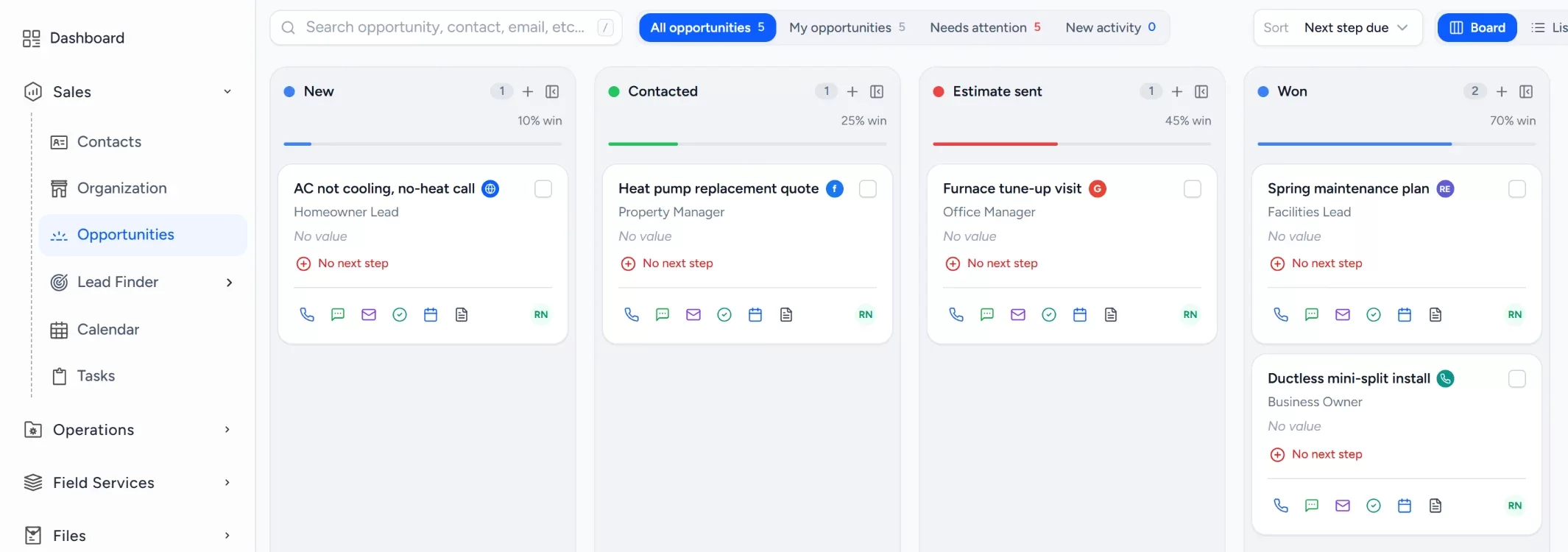
Move each estimate through its stages. When it is won, the job goes to the dispatch board without retyping the customer or address.
- checkStage totals at a glance
- checkLead source on every opportunity
- checkWon jobs move straight to scheduling
Automation
Reminders and follow-ups that send themselves
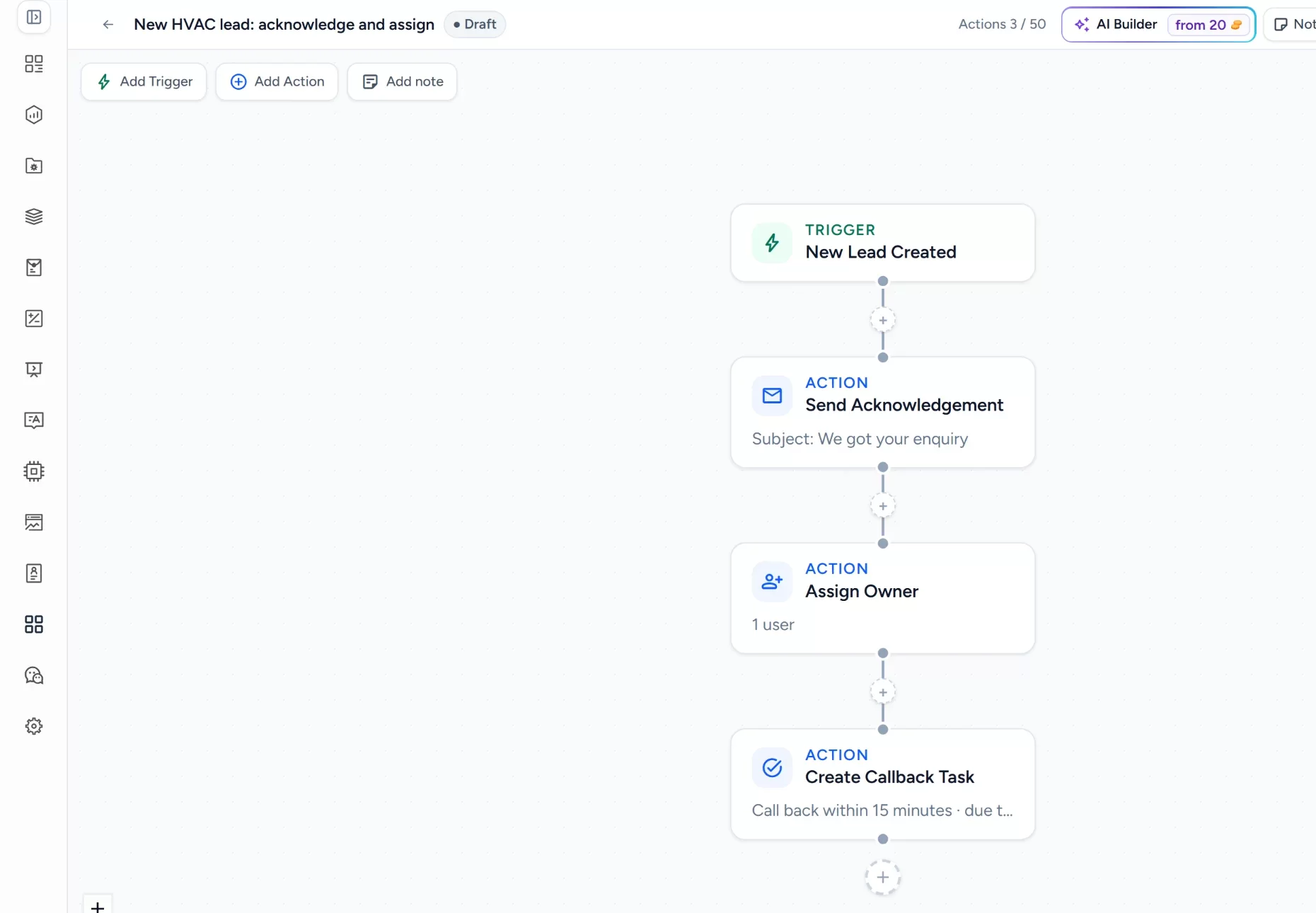
A workflow can create a task, send a text or email, then wait and check again. Build it once, test it as a draft, then publish.
- checkTriggers for new leads and stage changes
- checkActions for messages, owners and tasks
- checkDraft and test before it goes live
Customer record
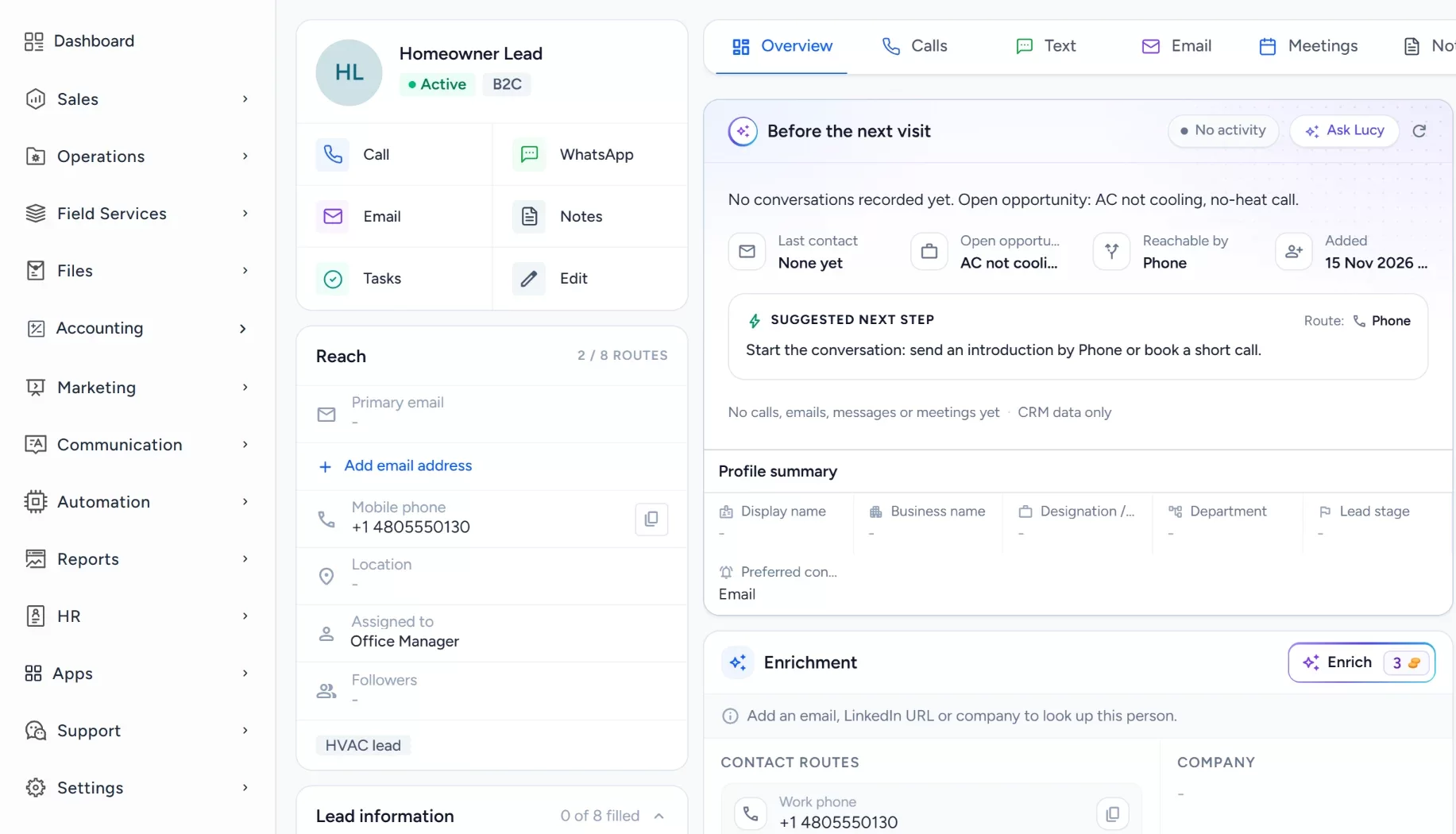
Every visit on the customer's record
Appointments, calls, texts, documents and tasks sit on the contact, so the dispatcher and the technician see the same history.
- checkAppointments next to the conversation
- checkCall, text and email from the record
- checkEstimates and documents attached
How it works for technician teams
From booked job to next visit
One schedule connects the customer record, the dispatch board, the route and the reminder for the next recurring visit.
- callPhone calls
- webWebsite form
- Gmail
- smsText messages
- Outlook
- handshakeReferrals
- 1event_availableJob booked from recordThe office books a job straight from the customer record, so the address and history are already there.
- calendar_monthCalendar
- 2view_timelineTech placed on boardEach job becomes a block on the dispatch board, and gaps in a technician's day show up at once.
- local_shippingDispatch board
- 3alt_routeDay route plannedThe route planner lists the stops in order, and the route is sent to the crew before they leave.
- routeRoute planner
- Twilio
- 4notifications_activeCustomer remindedA reminder text goes to the customer ahead of the visit, so fewer jobs end at a locked door.
- boltWorkflows
- smsText messages
- 5receipt_longInvoice and repeat setThe visit is closed out with an invoice, and the next recurring visit is booked on the calendar.
- receipt_longInvoices
- calendar_monthCalendar
- task_altTasks
autorenewEach recurring visit books the next one.
Some features depend on your plan. See plans
One schedule for every kind of service visit.
Pick a job type to see exactly how Arches handles it, from the booking to the follow-up.
Technician dispatch board
See who is free and who is booked
Arches has a dispatch board built in. Each crew gets a row, each job a block. Drag jobs between technicians and spot gaps in the day before a customer has to wait.
Technician route planning
Plan the day's stops before the van leaves
Pick a technician and a day, and the route planner lays out the stops in order, so less of the day is spent driving between jobs.
- location_onStop 1, residentialFurnace repair8:00 AM
- location_onStop 2, residentialThermostat swap10:15 AM
- location_onStop 3, small officeTune-up1:00 PM
Service appointment calendar
Every appointment on one shared calendar
Office staff and technicians see the same week. Colors show urgency, so an emergency call stands out from a routine tune-up.
Booking from the customer record
A call comes in, the job is booked in seconds
Open the customer, book the visit, and the name, address and history come with it. The customer gets a confirmation and the technician gets the full story.
- 1ArrivesCall comes in
- 2In secondsVisit booked from record
- 3InstantlyTechnician assigned
- 4Due nowConfirmation text sent
Appointment reminders
A reminder before every visit
Set a text or email reminder ahead of each appointment, and a task for the office when a customer asks to move it, so the schedule stays honest.
- SFSingle-family homeFurnace repair, Tue 10:00Reminder sends tomorrow
- THTownhomeThermostat swap, Wed 8:30Reminder sent
- SOSmall officeTune-up, Thu 1:00Asked to reschedule
- COCondoQuote visit, Fri 9:30Reminder sends Thursday
Recurring service visits
Every spring and fall visit booked on time
Tag maintenance customers and set a dated reminder before each visit, so the office books the next one while the last job is still fresh.
- FHFamily homeComfort plan, 2 visits a yearSpring visit in 14 days
- THTownhomeComfort planReminder sent
- RHRental homePriority service planFall visit booked
- COCondoComfort planRenewal in 30 days
Meet Lucy, your AI teammate
Arches keeps you organized. Lucy tells you what to do next.
Lucy shows you which customers are waiting on a callback and which visits still need a follow-up, so nothing slips between jobs.
Ask Lucy things like:
- chat_bubbleWhich scheduled service requests need an update?
- chat_bubbleWhich missed calls have not been returned?
- chat_bubbleWhich quotes have not heard back yet?
verified_userLucy only sees what you are allowed to see. She drafts emails and texts and suggests tasks, and nothing reaches a customer until you approve it. Lucy uses the AI credits included with your plan. See plans
Which scheduled service requests need an update?
2 customers are waiting. One asked about moving a furnace repair visit 2 days ago, and a water heater quote sent 5 days ago has no reply.
There is also 1 missed call from this morning that has not been returned.
Would you like me to draft a follow-up for you to review?
Set up this field service workflow in your own account.
Try Arches CRM free for 7 days, or book a demo and we will walk through your process.Start free trial arrow_forwardBook a demoGetting started
Add your technicians and set up one service pipeline with the stages your office actually uses, such as new request, scheduled and done. Move a handful of real customers in, book a few visits from their records and watch them appear on the dispatch board. Then turn on appointment reminders and one follow-up workflow, and add recurring visits once the daily schedule feels right.
Works alongside your tools
Keep the accounting package and any specialist service software you already rely on. Arches connects Gmail and Outlook for email, Twilio for calls and texts, and your calendar for appointments, so customer conversations and scheduling stay in step with the tools your office uses every day.
What are missed leads costing you?
Drag the sliders to your own numbers. Plain arithmetic, nothing hidden. For a wider view, try the lead cost calculator.
Estimated revenue lost each year
$103,680
Leads dropped a month
18
Jobs lost a month
7.2
An estimate from the numbers you enter, not a promised result: leads x share never followed up x close rate x job value x 12. Change the sliders to match your business.
Why service teams switch to Arches
Scheduling, sales and customer history in one system, without enterprise pricing or weeks of setup. See how Arches compares with Salesforce and Pipedrive.
| What your office needs |  Arches CRMEverything in one CRM | Phones and spreadsheets | Complex CRMs |
|---|---|---|---|
| Dispatch board for every crewDrag jobs between technicians | check_circleBuilt in | cancelShared sheet | do_not_disturb_onSeparate product |
| Route planner for the dayStops laid out in order | check_circleBuilt in | cancelBy hand | do_not_disturb_onPaid add-on |
| Booking from the customer recordAddress and history come with it | check_circleBuilt in | cancelRetype it | do_not_disturb_onHigher tiers |
| Text and email remindersBefore each appointment | check_circleBuilt in | cancelFrom memory | do_not_disturb_onOften extra |
| Time to get startedFrom sign-up to first booking | check_circleMinutes | cancelNo real system | do_not_disturb_onWeeks |
| No lock-in contractCancel anytime | check_circleYes | cancelFree, but jobs slip | do_not_disturb_onAnnual contracts |
Some features depend on your plan, and you can try Arches CRM free for 7 days. Compare plans
Technician scheduling software questions
Reviewed by the Arches CRM team. Updated 15 November 2026.
Other trades we build for: field service, HVAC and plumbers.
What is technician scheduling software?add
Technician scheduling software lets an office book field service jobs, assign them to the right person and see every crew's day in one view. In Arches it sits next to the customer record, so booking never means retyping.
Does it include a dispatch board and route planner?add
Yes. The dispatch board shows each crew's jobs across the day, and the route planner lays out a technician's stops in order.
Can I book a visit from the customer record?add
Yes. Open the contact, book the appointment and the name, address and history carry over. You can then call, text or email the customer from the same screen.
Can Lucy follow up with customers for us?add
Lucy can review your service requests, point out customers waiting on an update and draft the follow-up. You read and approve every message before it reaches the customer.
Does Arches CRM replace our industry software?add
Not necessarily. Keep the accounting or specialist tools you rely on. Arches handles the customer record, scheduling, dispatch and follow-up, and connects to the tools it supports.
How much does Arches CRM cost?add
Plans are priced per user per month with no lock-in, and a 7-day trial lets you try the schedule first. See pricing for the details.
Every job, booked right.
Run next week's schedule through Arches for seven days and see how much smoother the day runs.
- check_circle7-day free trial
- check_circleNo credit card
- check_circleNo onboarding fee