shieldInsuranceThe CRM built for insurance agencies
Insurance CRM from first inquiry to renewal
Catch every web form, ad and call inquiry, assign it in seconds and follow up each quote until the client decides. Then keep renewals on the calendar, next to your policy system.
Shoppers ask three agencies for a quote and answer the first one that follows up. In between, clients with a renewal approaching expect a call before the term ends. When quote statuses live in an inbox and renewal dates in a spreadsheet, both conversations slip.
Arches CRM tracks each quote request as an opportunity with an owner, a status and a dated task, and puts the policy anniversary on the client record as a reminder. Your rater still builds the quote and your policy system still issues the policy.
How it works for insurance teams
From first inquiry to renewal, in one place
Follow one insurance shopper from the first quote request to the policy anniversary, with every call, text and email on one record.
inputLeads and messages come in from
webWebsite form
Facebook Lead Ads
Google Ads
callPhone calls
handshakeReferrals
south
1inboxInquiry lands, agent assignedEvery form, ad lead and call becomes a contact and goes to an agent in seconds, with a first reply sent.
Twilio
Gmail
2calculateQuote built, opportunity loggedYou build the quote in your own rater, then log it in Arches as an opportunity with its value and next step.
calculateYour rater
task_altTasks
3forumFollow up until they decideCalls, texts and emails go out from one inbox, and a task keeps each shopper from slipping away.
Twilio
Gmail
WhatsApp
4verifiedPolicy soldMark the opportunity won in Arches. The policy is issued in your agency management system, not in Arches.
databaseYour agency system
5event_repeatRenewal reminder setA task and a message are scheduled ahead of the policy anniversary so you reach the client before the renewal.
boltWorkflows
calendar_monthCalendar
autorenewEach renewal reminder starts the conversation again.
shieldClients kept, renewals never missedEvery quote gets followed up and every anniversary gets a reminder, all on the client record.
From quote sent to a decision, with no shopper forgotten
Build the quote in your own rater, then track it here as an opportunity with a value, an owner and dated follow-ups. Workflows send the check-ins until the client decides.
YBYour insurance businessQuote from Arches CRM
OPPORTUNITYNov 10, 2026
Client Client, Single-family homeOwner Agent
Quoted line
Detail
Homeowners, quoted in your rater
Selected
Auto, two vehicles
Selected
Umbrella
Added
Status
Won
Won with Client, Nov 12Quote source: your rater
WON
sendQuote sent from your raterNov 10, 9:12 AM
callFollow-up call by the agentNov 11, automatic task
chatText check-inNov 12, sent by workflow
verifiedClient says yesNov 12, moved to Policy sold
event_repeatMarked won, renewal reminder setNov 12, renewal task for Oct 2027
Tag clients with their renewal month and set a reminder ahead of each term. The account owner reaches out early to review coverage, so renewals do not catch anyone by surprise.
HAHouseholdHome and auto, annualRenewal in 60 days
FAFamilyAuto, six monthReview call booked
HOHomeownerHome, annualRenewal email sent
LRLife review clientLife review, annualRenewal in 45 days
Multi-policy and referral calls booked, not forgotten
Tag clients who hold one policy and book a coverage review call. When a client refers a friend, the intro call goes on the calendar and a thank-you task goes to the person who sent them.
When a client has a claim open with their carrier, log a check-in call as a task with an owner and a date. The claim itself stays with the carrier. Arches keeps the notes and the next call.
Every location and contact under one business record
Keep each location, owner and office contact under one company record, with every email, call and document in its history, so nobody asks the client the same question twice.
apartmentRestaurant group3 locations, 11 contacts, 1 company record
menu_bookStep-by-step guide: Keep coverage inquiries and quote requests from falling between brokersRead the guide arrow_forward
auto_storiesBusiness story: Helping every coverage inquiry reach a clear next conversationRead the story arrow_forward
Meet Lucy, your AI teammate
Arches keeps you organized. Lucy tells you what to do next.
Lucy finds unanswered inquiries and customers who have not heard back, so every quote request gets a reply.
Ask Lucy things like:
chat_bubbleWhich inquiries have not been answered?
chat_bubbleWhich customers have not heard back?
chat_bubbleWhich quotes are still waiting on a decision?
verified_userLucy only sees what you are allowed to see. She drafts emails and texts and suggests tasks, and nothing reaches a customer until you approve it. Lucy uses the AI credits included with your plan. See plans
Which customers have not heard back?
L
Lucy
3 customers have not heard back. One asked for a home and auto quote 4 days ago, and another is waiting on a callback about a renewal.
The third is a website inquiry from yesterday with no reply yet.
Would you like me to draft a follow-up for you to review?
Set up this insurance workflow in your own account.
One workspace from first inquiry to renewal reminder.
Sales pipeline
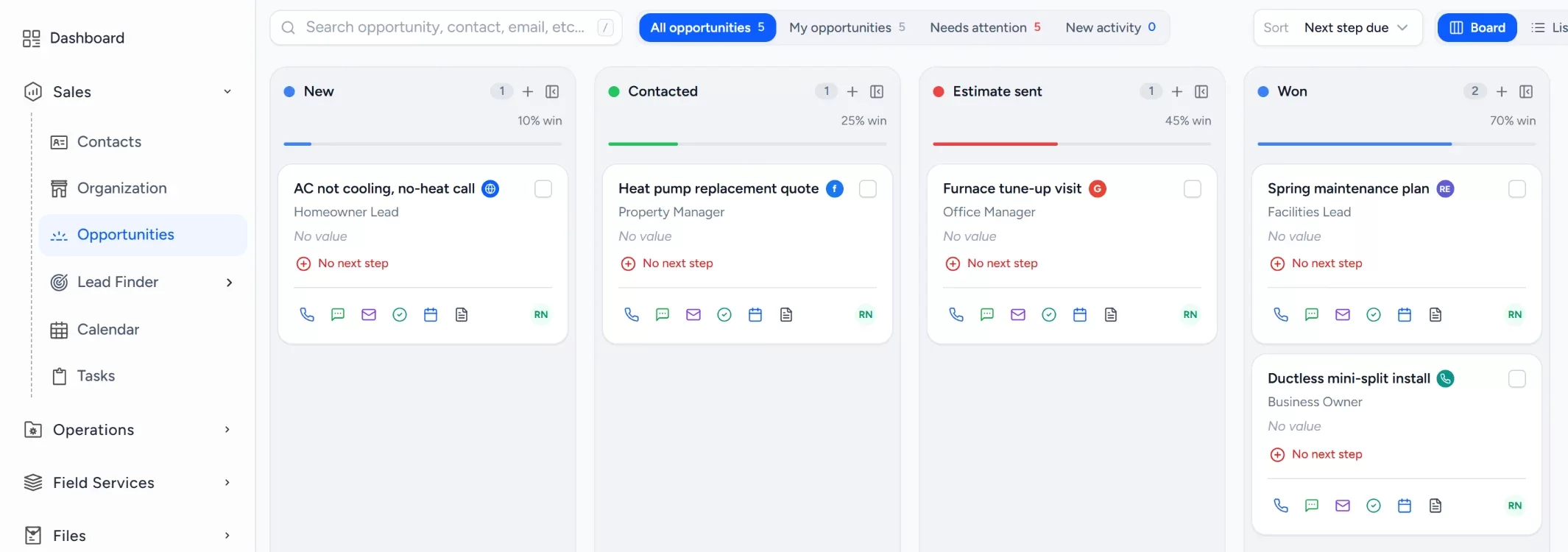
Every quote request by stage
Move each opportunity from new inquiry to policy sold. Each card shows the value you enter, the lead source, the owner and one-tap call, email and text.
checkStage totals at a glance
checkLead source on every opportunity
checkLost reasons tracked so you know what to fix
Automation
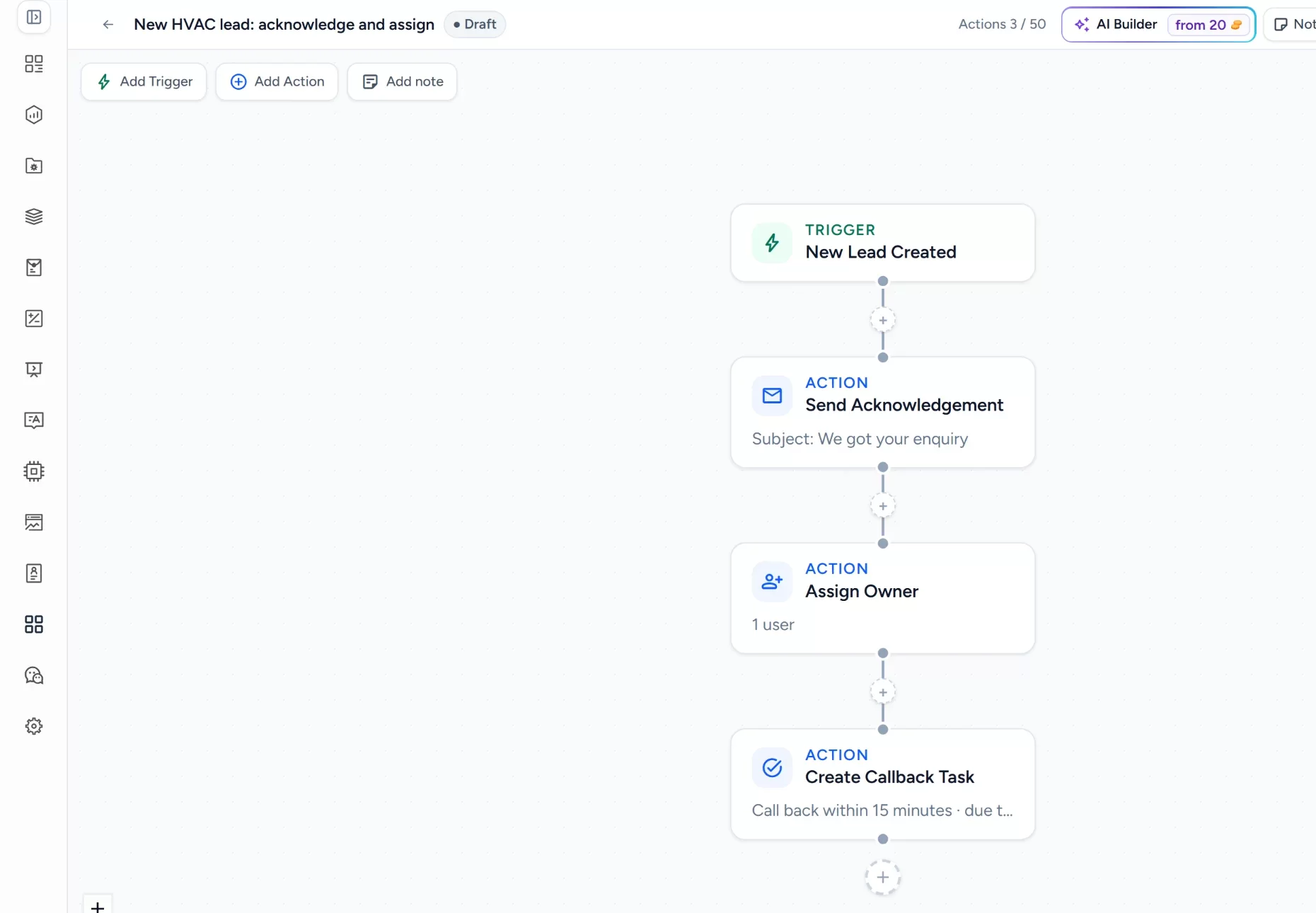
Every new inquiry answered and followed up
A workflow acknowledges each new inquiry, assigns an owner and creates a quote call task the moment it arrives. Later steps send follow-up emails and texts. Build it once, test it as a draft, then publish.
checkTriggers for new leads and stage changes
checkActions for replies, owners, tasks and waits
checkDraft and test before it goes live
Customer record
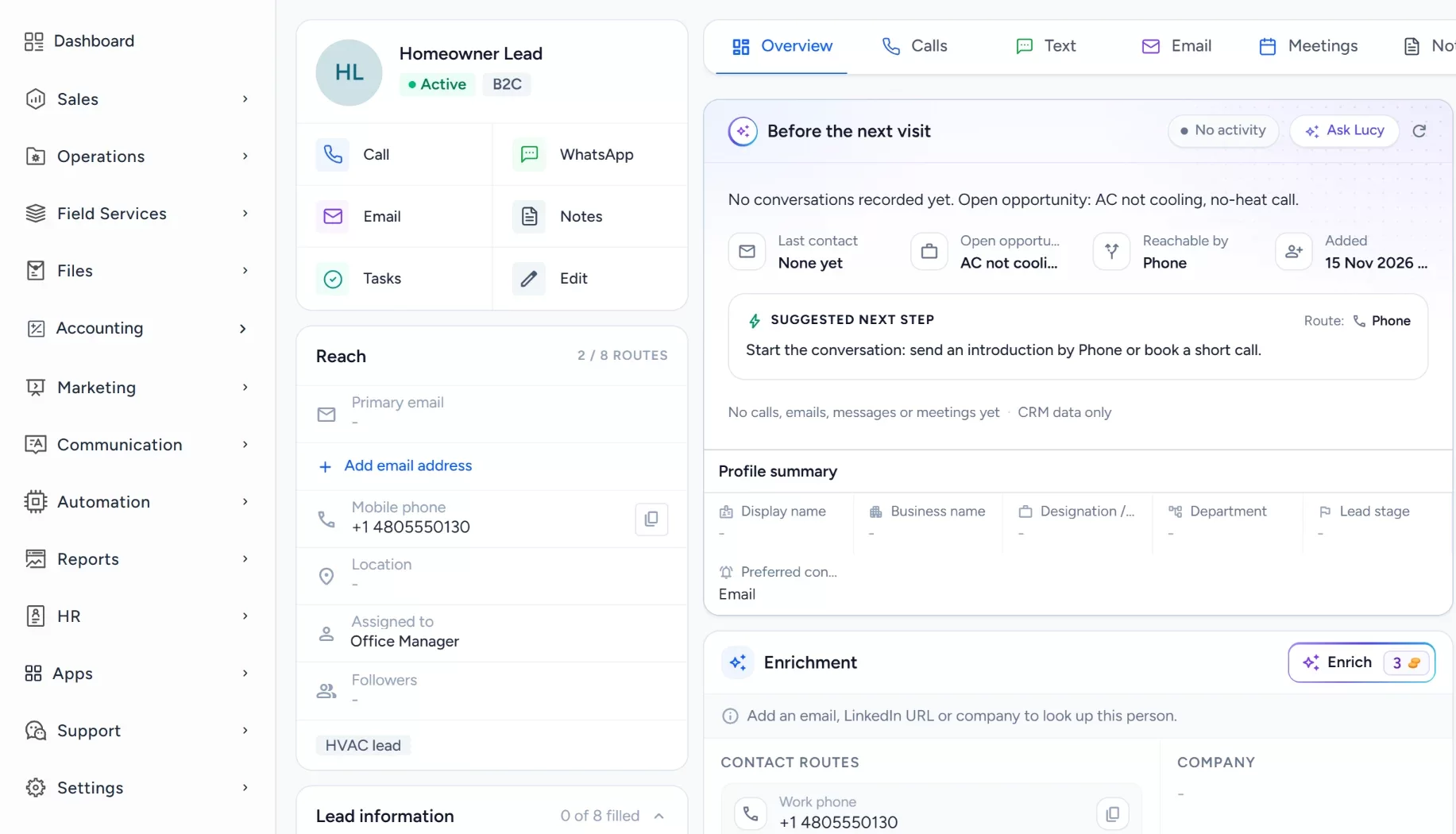
The whole client history, one screen
Emails, calls, notes, documents and tasks sit on the contact, so anyone in the office can pick up the conversation where it stopped. Renewal dates and policy notes stay with the client.
checkTasks next to the conversation
checkCalls recorded and logged on the record
checkDocuments and notes attached
Getting started
Import your active clients and open prospects, then build a pipeline with stages such as new, quote requested, follow-up and policy sold. Add each client's renewal date to their record and set a reminder task ahead of it. Create one workflow that assigns an agent and creates the quote call task, and test it as a draft before you publish.
Works alongside your tools
Keep your rater, carrier portals and agency management system exactly where they are, because Arches does not quote premiums or issue policies. It connects Gmail and Outlook for email, Twilio for calls and texts, and your calendar, so the conversation and the renewal reminder sit on the client record.
What are missed quote requests costing you?
Drag the sliders to your own numbers. The result is premium times your commission rate, so it shows agency revenue, not premium. For a wider view, try the lead cost calculator.
An estimate from the numbers you enter, not a promised result: leads x share never followed up x close rate x job value x 12. Change the sliders to match your business.
Why insurance agencies switch to Arches
Everything sales and client follow-up need, in one system, without enterprise pricing or weeks of setup. It works alongside your rater and agency management system. See how Arches compares with Salesforce and Pipedrive.
Arches CRM compared with phones and spreadsheets and with complex CRM platforms
What your office needs
Arches CRMEverything in one CRM
Phones and spreadsheets
Complex CRMs
Facebook and Google leads capturedNo copy-paste from ad managers
check_circleAutomatic
cancelCopy-paste
do_not_disturb_onPaid add-on
Calls, email and text in one inboxShared with the whole office
check_circleBuilt in
cancelPersonal inboxes
do_not_disturb_onOften extra
Automated quote follow-upWorkflows run until a decision
check_circleBuilt in
cancelFrom memory
do_not_disturb_onHigher tiers
Renewal reminders on a calendarDated tasks with an owner
check_circleBuilt in
cancelSeparate tools
do_not_disturb_onSeparate product
Time to get startedFrom sign-up to first lead
check_circleMinutes
cancelNo real system
do_not_disturb_onWeeks
No lock-in contractCancel anytime
check_circleYes
cancelFree, but leads leak
do_not_disturb_onAnnual contracts
Some features depend on your plan, and you can try Arches CRM free for 7 days. Compare plans
Insurance CRM questions
Reviewed by the Arches CRM team. Updated 15 November 2026.
An insurance CRM is software that keeps every prospect, client, quote follow-up and conversation in one shared record, so the office knows who owns each lead and what happens next. Our guide to CRM covers the basics.
Can it capture leads from forms, ads and calls?add
Yes. Web forms, Facebook Lead Ads and Google lead forms create records with their source, next to email, text, WhatsApp and recorded calls, all in one inbox.
Does Arches CRM quote premiums or issue policies?add
No. Arches CRM is a sales and follow-up system. You build quotes in your own rater and manage policies in your agency management system. Arches tracks the opportunity, the follow-up and the client record around them.
How does it help with renewals?add
Add each renewal date to the client record and set a reminder task ahead of it. A workflow can also send a check-in email or text, so the owner reaches out before the term ends.
Can Lucy follow up with clients for us?add
Lucy can find quote requests with no reply and draft the follow-up. You review and approve each message, and nothing reaches a client until you do.
How much does Arches CRM cost?add
Plans are priced per user per month with no lock-in. See pricing for the details.
Every quote request, answered first.
Run this month's quote requests through Arches for seven days and see how many more policies you sell.

 Log in
 Start Free Trial