
 Log in
 Start Free Trial

Insurance agencies · Workflow guide
How insurance agencies can keep coverage inquiries organized
Insurance agencies receive coverage inquiries through several channels, and quote requests often pass between brokers without an owner. Centralize intake in contact records, assign each quote request to an agent, track status to a decision and set reminders, leaving policy administration to the agency system.

- Industry
- Insurance agencies
- Primary challenge
- Inquiries across channels without an owner
- Arches CRM focus
- Policy inquiries, quotations, renewal follow-ups and agency coordination
Business goals
- Centralize coverage inquiries in one intake
- Assign every quote request to an agent
- Remind agents of renewal and follow-up tasks
Challenge and proposed solution
When correspondence is spread across mailboxes
Independent agencies handle new coverage inquiries, requests for policy comparisons and customer questions about renewals. Different agents manage different product lines.
Challenge
Coverage inquiries come through several channels
Arches CRM setup
Centralize contact and intake records, with a website form that creates a record with its source.
An agent confirms the coverage needs with the customer.
Challenge
Quote requests move between brokers without ownership
Arches CRM setup
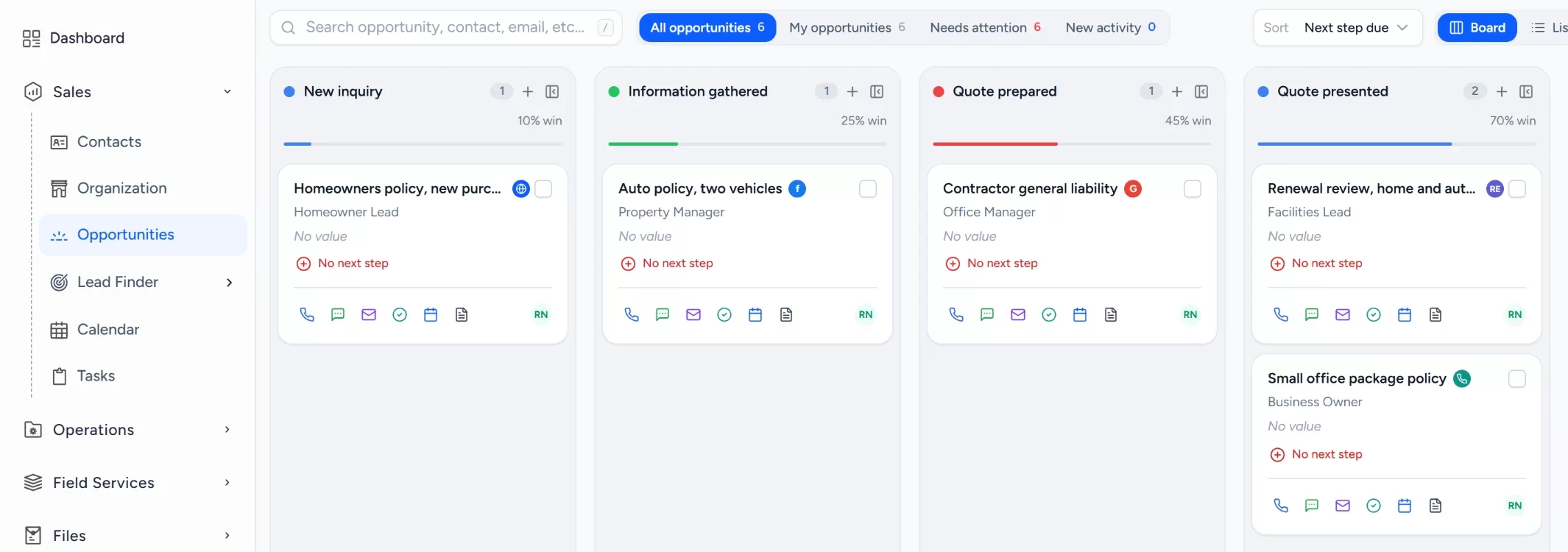
Assign an agent to each quote-request Opportunity and track its stage to a decision.
The agent prepares the quote in the carrier or agency system.
Challenge
Renewal contacts are easy to miss
Arches CRM setup
Create tasks and reminders for renewal outreach and inquiry follow-up.
This is sales reminder tracking, not policy administration.
CRM configuration and daily workflow
What the team configures
- 1New inquiry
- 2Coverage requirements
- 3Quote requested
- 4Quote presented
- 5Customer decision
- 6Won or lost
Organize contacts and companies
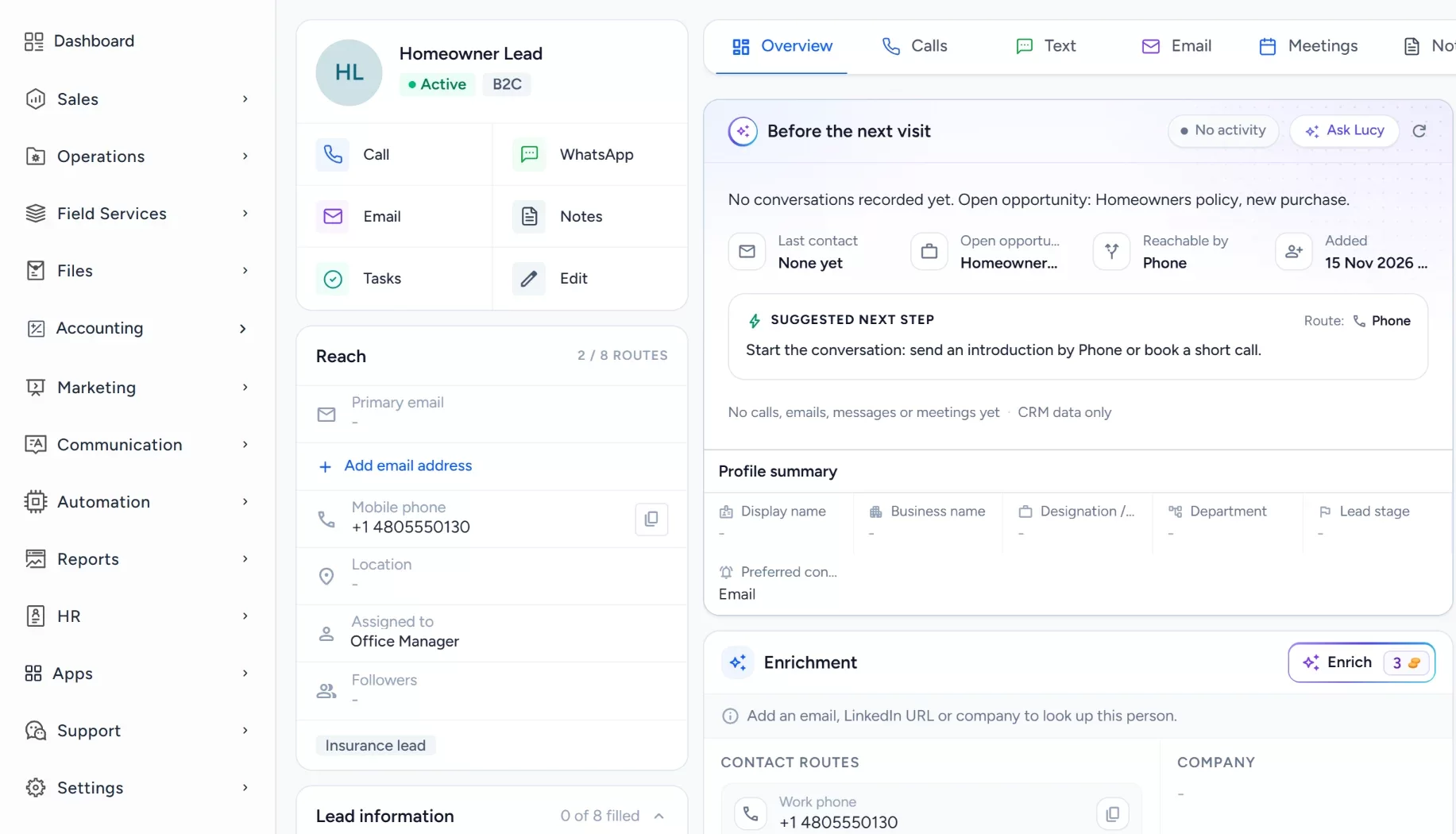
Individual and business customers each have a record with their requirements and conversation history.
Assign quote opportunities
Each quote request is an opportunity owned by the agent for that product line.
Track status to the decision
Stages run from requirements through quote presented to the customer decision, with lost reasons recorded.
Create renewal and inquiry tasks
Tasks for renewal conversations and inquiry follow-ups keep the next contact on the owner's list.
Log email on the customer
Connected Gmail or Outlook mailboxes keep sent and received messages on the contact.
- Gmail
- Outlook
Workflow recipe
Build it in Workflows
When a quote is requested, this workflow assigns the inquiry and creates the first task, so no request sits in a mailbox.
When
An Opportunity moves to the stage Quote requested, or a quote request form is submitted
Only if
- The request is for a product line your agency sells
- No owner is set yet
Then
- Assign an owner for the product line
- Create a task: Respond to the quote request
- Send an internal notification to the owner
Lucy participation
Where Lucy helps
- TriggerA quote presented last week has had no reply and no open task.
- ContextLucy reads the contact, the quote-request Opportunity and the logged email the agent may open.
- ProposalLucy suggests a follow-up task and drafts a neutral check-in. It does not recommend coverage.
- ReviewA person reads the draft, edits it and approves it. Customer sends from Lucy need approval before anything leaves.
- LoggedThe approved message and the follow-up task are logged on the record's activity, so the next person sees what was sent.
Before and after
How the process changes
Without the suggested setup
- Inquiries arrive in separate inboxes and phones
- Quote requests have no clear owner
- Renewal outreach depends on memory
- Brokers cannot see each other's status
With the suggested setup
- Inquiries become intake records
- Each quote request is assigned to an agent
- Tasks remind agents of follow-ups
- Stages show where each request stands
A comparison of typical processes, not measured results.
How to configure
Set it up in five steps
Create your first records
In Sales > Contacts and Sales > Organization, add your customers and open a quote-request Opportunity in Sales > Opportunities.
Configure the lead source
In Sales > Lead Finder > Form Builder, build the request form, then add the Website Form Capture card under Settings > Integrations to put it on your site.
Set the Opportunity pipeline
In Sales > Opportunities, open the pipeline settings and add the stages: New inquiry, Coverage requirements, Quote requested, Quote presented, Customer decision, Won or lost. Add lost reasons for work that is not won.
Set tasks, workflows and the approval policy
In Automation > Workflows, create a workflow on the stage changed or form submitted trigger that creates a task and assigns the owner. Lucy drafts wait for a person to approve them, while a workflow email step sends as you configure it.
Check it with a real interaction
Open the Dashboard to see the new records, check Communication > Notifications for the task alert, and send an email from a connected inbox and confirm it logs on the contact.
Intended benefits
What this setup is designed to improve
Scope. Arches CRM covers the sales conversation around quotes, and it does not replace your agency management system for policy administration and regulated records.
- Designed to give sales communications a consistent process
- Designed to make team assignments clear by product line
- Designed to keep quote and renewal tasks visible
- Designed to organize the sales side, with no premium or renewal claims
Screens
What the team sees in Arches
Questions about this workflow
Does Arches CRM issue or manage policies?
No. It is not a policy administration system. It covers the sales conversation around quotes.
How is sensitive insurance information handled?
Roles and permissions control who sees each record. Keep entries to what the sales process needs.
Can Lucy recommend coverage?
No. Lucy drafts messages and answers questions about records, and customer sends need approval. Coverage advice stays with licensed staff.
Related workflows
Keep borrower inquiries and referral partner relationships in one place
Track borrower introductions and referral partners, assign the responsible officer and keep every next step visible.Read the guideExplore Arches CRM for Insurance Agencies
The full insurance page: lead capture, pipeline, automation and FAQs.Open the pageBusiness story: Helping every coverage inquiry reach a clear next conversationRead the story
Explore Arches CRM for Insurance Agencies.
Or book a demo and we will walk through this workflow with your own team.Explore Arches CRM for Insurance Agencies Book a demo