
 Log in
 Start Free Trial

Marketing and creative agencies · Workflow guide
How marketing agencies can keep new business and client conversations organized
Marketing agencies often collect prospects from ads, the website and referrals into separate lists, and proposals lack clear accountability. Route supported sources into consistent records, assign an owner and next action to each proposal, and show managers pipeline progress across service lines in one shared view.

- Industry
- Marketing and creative agencies
- Primary challenge
- Separate lead lists from every channel
- Arches CRM focus
- Lead intake, discovery calls, proposals and account relationships
Business goals
- Bring every lead source into one record format
- Give each proposal an owner and next action
- Show managers progress across service lines
Challenge and proposed solution
When the handoff drops the thread
Marketing agencies serve clients across retail, property, hospitality and more. Inquiries come from the website, referrals and campaigns, and each prospect wants very different services.
Challenge
Ads, the website and referrals create separate lead lists
Arches CRM setup
Route supported sources into consistent lead records with the source noted.
Someone confirms which sources are connected.
Challenge
Proposals and client conversations lack accountability
Arches CRM setup
Assign an owner and a next action to every proposal Opportunity.
The proposal itself is written by the team.
Challenge
Managers cannot see progress across service lines
Arches CRM setup
Use pipeline stages, source fields and the dashboard to review new business.
Managers decide how to group service lines.
CRM configuration and daily workflow
What the team configures
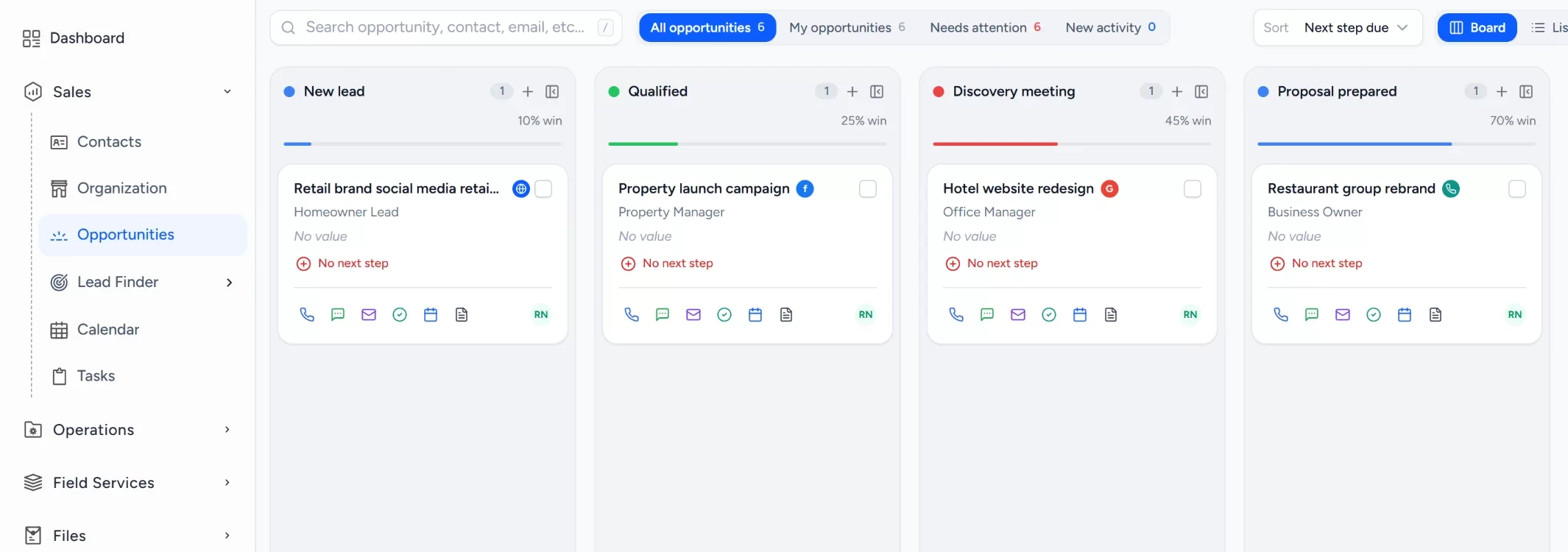
- 1New lead
- 2Qualified
- 3Discovery meeting
- 4Proposal prepared
- 5Client review
- 6Won or lost
Capture leads with their source
Website forms create leads and record where each one came from, such as a campaign or a referral.
Set consistent lead ownership
A workflow assigns each new lead to a business development owner and creates a first-contact task.
Note the services a prospect needs
Custom fields and notes capture the services requested, so the discovery meeting starts informed.
Run proposals through one pipeline
Each proposed engagement follows the same stages from discovery to client review.
Keep activity on the records
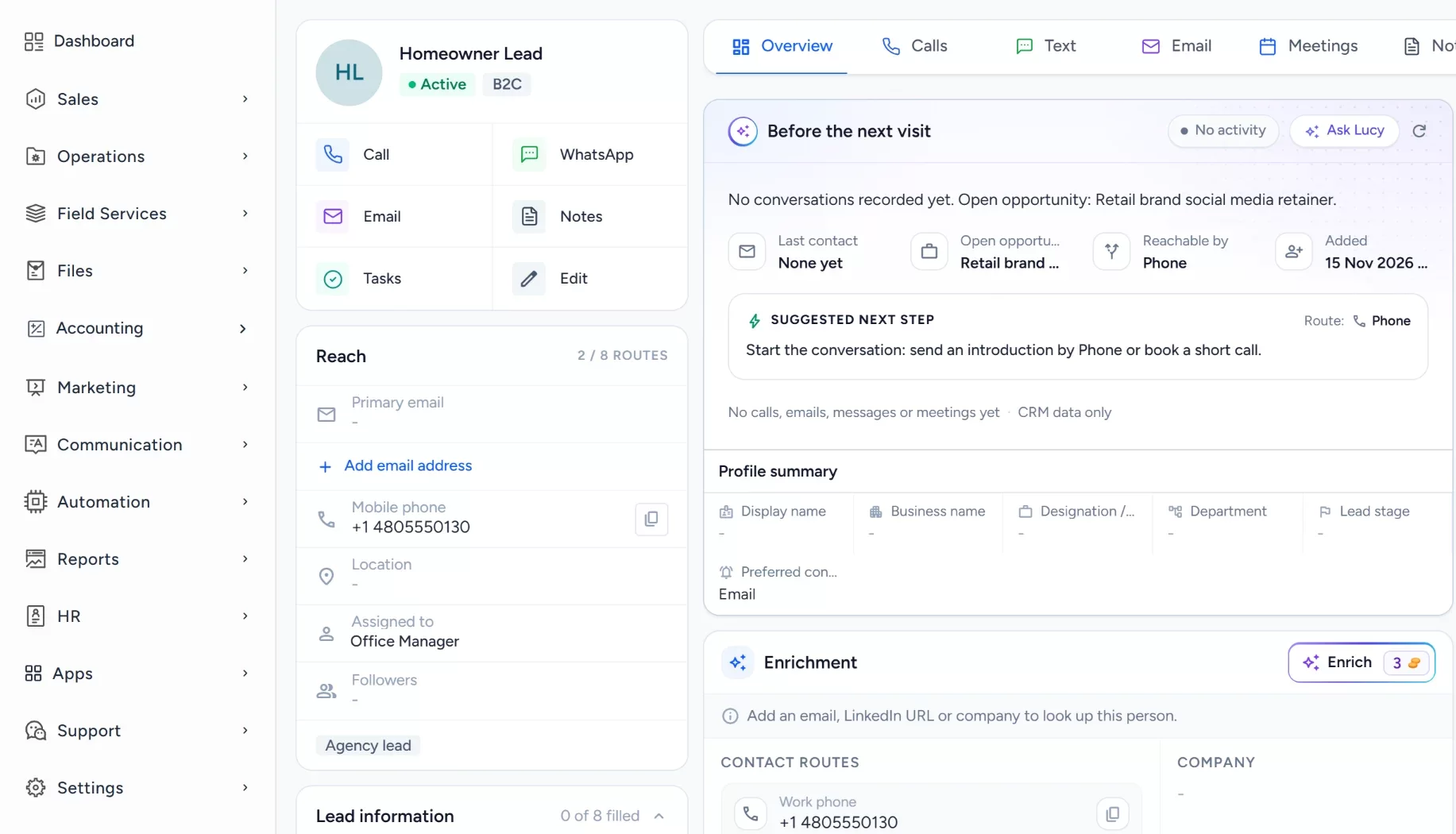
Calls, emails and notes live on the contact and the opportunity, ready for the account manager.
Workflow recipe
Build it in Workflows
When a proposal is prepared, this workflow creates the decision follow-up task so a prospect never goes quiet unnoticed.
When
An Opportunity moves to the stage Proposal prepared
Only if
- The Opportunity is in the new business pipeline
- The Opportunity has a lead owner
Then
- Create a task: Follow up for a decision
- Assign the task to the lead owner
- Wait three days, then send an internal notification if the task is still open
Wait and If/Else steps depend on your plan.
Lucy participation
Where Lucy helps
- TriggerA prospect has completed a discovery meeting and no proposal task exists.
- ContextLucy reads the prospect's record, the services noted and logged activity that the account lead may open.
- ProposalLucy suggests a proposal task and drafts a short thank-you and next-steps message.
- ReviewA person reads the draft, edits it and approves it. Customer sends from Lucy need approval before anything leaves.
- LoggedThe approved message and the follow-up task are logged on the record's activity, so the next person sees what was sent.
Before and after
How the process changes
Without the suggested setup
- Each channel keeps its own lead list
- Proposals wait on whoever wrote them
- Client conversations are hard to find
- Managers see progress only by asking
With the suggested setup
- Supported sources feed one record format
- Each proposal has an owner and next action
- Activity is kept on the prospect record
- Managers review stages across service lines
A comparison of typical processes, not measured results.
How to configure
Set it up in five steps
Create your first records
In Sales > Contacts, add a few prospects and note the services each needs, then open a proposal Opportunity in Sales > Opportunities.
Configure the lead source
In Sales > Lead Finder > Form Builder, build the contact form for the site, and connect ad lead forms under Settings > Integrations.
Set the Opportunity pipeline
In Sales > Opportunities, open the pipeline settings and add the stages: New lead, Qualified, Discovery meeting, Proposal prepared, Client review, Won or lost. Add lost reasons for work that is not won.
Set tasks, workflows and the approval policy
In Automation > Workflows, create a workflow on the stage changed or form submitted trigger that creates a task and assigns the owner. Lucy drafts wait for a person to approve them, while a workflow email step sends as you configure it.
Check it with a real interaction
Open the Dashboard to see the new records, check Communication > Notifications for the task alert, and submit your form and confirm the source shows on the new lead.
Intended benefits
What this setup is designed to improve
Scope. Arches CRM covers prospects and proposals, and it does not replace project management, creative production or timesheet tools.
- Designed to give one view of prospective client work
- Designed to make follow-up ownership clearer
- Designed to carry context from business development to account managers
- Designed to organize leads, not to promise more clients
Screens
What the team sees in Arches
Questions about this workflow
Is Arches CRM a campaign management platform?
No. It tracks prospects and proposals. Ad and campaign management stay in their own tools.
Can lead source be tracked?
Yes. Forms record the source.
Can Lucy draft replies?
Yes. Lucy drafts replies for review, and customer sends need approval unless an admin has authorized a workflow send policy.
Related workflows
Follow up every roofing estimate until the homeowner decides
Give every sent roofing estimate an owner, a dated follow-up task and a workflow that flags quiet ones.Read the guideExplore Arches CRM for Marketing Agencies
The full agency page: lead capture, pipeline, automation and FAQs.Open the pageBusiness story: Giving every agency proposal a clear owner and next stepRead the story
Explore Arches CRM for Marketing Agencies.
Or book a demo and we will walk through this workflow with your own team.Explore Arches CRM for Marketing Agencies Book a demo