
 Log in
 Start Free Trial

B2B SaaS and technology · Workflow guide
How B2B software teams can build a clearer sales process
SaaS teams collect demo requests from several places and run evaluations that involve many stakeholders over a long time. Centralize leads, track demos and proposals as stages, group contacts under their company, and give managers a clear view of which Opportunities are active.

- Industry
- B2B SaaS and technology
- Primary challenge
- Scattered demo requests and long evaluations
- Arches CRM focus
- Demo requests, qualification, proposals and pipeline visibility
Business goals
- Centralize demo requests from every source
- Keep stakeholder context across long evaluations
- Tell active Opportunities from stale ones
Challenge and proposed solution
When nobody can see what has stalled
B2B software teams handle demo requests, partner referrals and outbound leads. Prospects range from small teams to enterprise buyers who need security reviews, stakeholder demos and negotiation.
Challenge
Demo requests are scattered across multiple sources
Arches CRM setup
Capture requests with source tracking and keep qualification notes on each lead record.
A rep qualifies the request in a conversation.
Challenge
Long evaluations lose stakeholder context
Arches CRM setup
Group people under their organization and log meetings and follow-up tasks on the Opportunity.
Reps record what was discussed after each meeting.
Challenge
Managers cannot tell active from stale Opportunities
Arches CRM setup
Use dashboards, expected close dates and the Forecast view to review the pipeline by stage.
Managers decide which stalled Opportunities to revisit.
CRM configuration and daily workflow
What the team configures
- 1New lead
- 2Qualified
- 3Demo scheduled
- 4Demo completed
- 5Proposal
- 6Negotiation
- 7Won or lost
Capture demo requests
A demo request form creates the lead with its source recorded, so partner and website leads can be told apart.
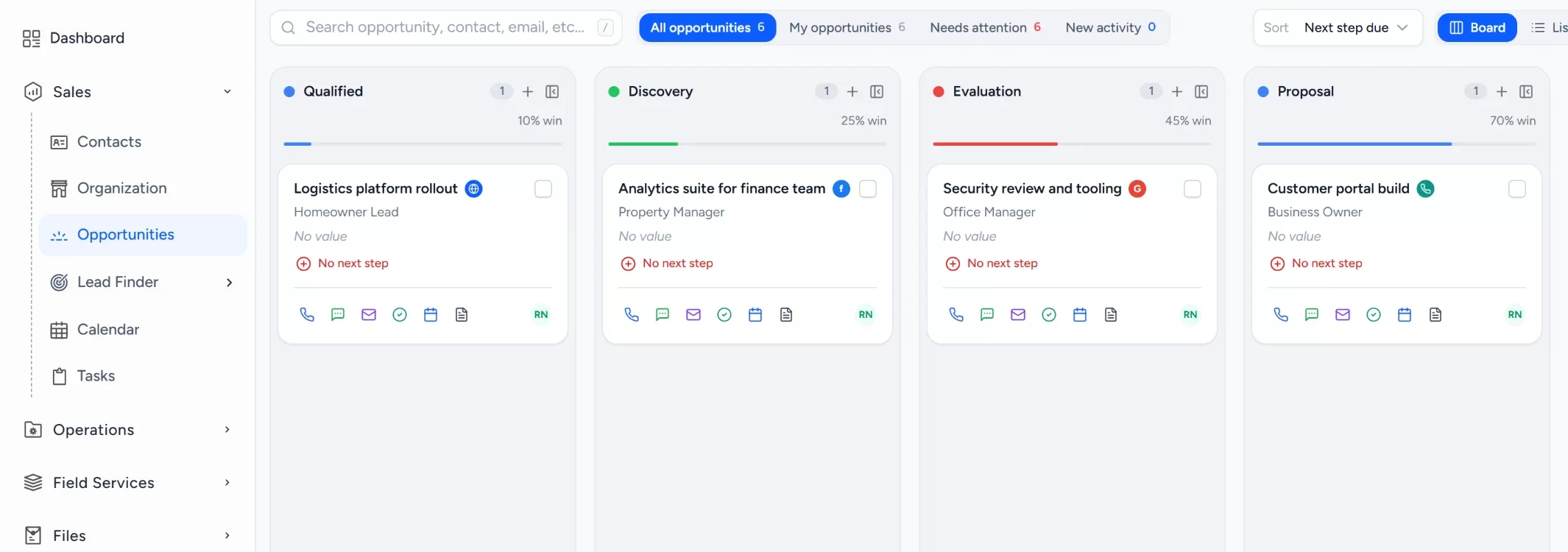
Define the opportunity pipeline
Stages run from qualified to won or lost, each with agreed criteria and a named owner.
Group people under their company
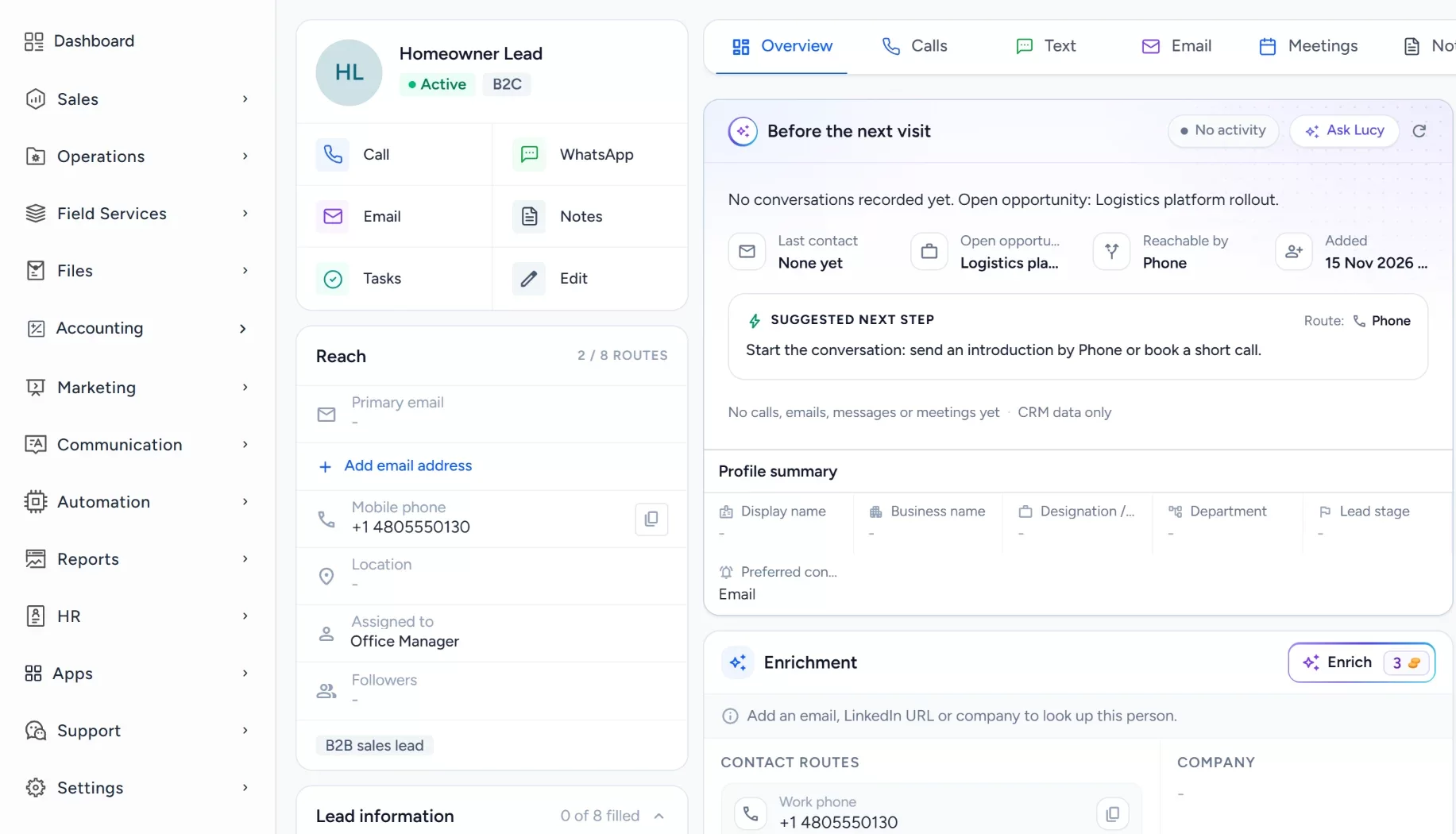
Organizations hold the buyers, notes and customer activity for each account, from first call to security review.
Keep expected close dates and values
Each opportunity carries a close date and a value, entered by the rep once they are confirmed.
Review pipeline health
Dashboards and the forecast view show open opportunities by stage and forecast category.
Workflow recipe
Build it in Workflows
When an Opportunity goes quiet, this workflow tells the owner and puts a review task on their list so long evaluations do not stall unnoticed.
When
An Opportunity has been quiet for 7 days
Only if
- The Opportunity is in your sales pipeline
Then
- Send an internal notification to the owner
- Create a task to review the Opportunity and agree the next step
Lucy participation
Where Lucy helps
- TriggerA demo is booked for tomorrow on a proposal-stage Opportunity.
- ContextLucy reads the Opportunity, its contacts, notes and logged activity that the rep may open.
- ProposalLucy prepares a short meeting brief and suggests a next step and a follow-up task.
- ReviewA person reads the draft, edits it and approves it. Anything Lucy drafts for a customer waits for a person to approve it before it leaves.
- LoggedThe approved message and the follow-up task are logged on the record's activity, so the next person sees what was sent.
Before and after
How the process changes
Without the suggested setup
- Demo requests land in several inboxes and lists
- Stakeholder context lives in individual notes
- Evaluations stall without anyone noticing
- Managers rebuild the pipeline by asking reps
With the suggested setup
- Requests become lead records with a source
- People are grouped under their company
- Each Opportunity carries a stage, date and next task
- Managers review the pipeline on a dashboard
A comparison of typical processes, not measured results.
How to configure
Set it up in five steps
Add your first records
In Sales > Organization, add a company, then add two contacts in Sales > Contacts and link an Opportunity in Sales > Opportunities.
Configure the lead source
In Sales > Lead Finder > Form Builder, build the request form, then add the Website Form Capture card under Settings > Integrations to put it on your site.
Set the Opportunity pipeline
In Sales > Opportunities, open the pipeline settings and add the stages: New lead, Qualified, Demo scheduled, Demo completed, Proposal, Negotiation, Won or lost. Add lost reasons for work that is not won.
Set tasks, workflows and the approval policy
In Automation > Workflows, create a workflow on the stage changed or form submitted trigger that creates a task and assigns the owner. Lucy drafts stay as drafts until a person approves them. A plain Send email step in a workflow sends on its own, so use it only for messages you are happy to go out automatically.
Check it with a test run
Open the Dashboard to see the new records, check Communication > Notifications for the task alert, and check the Forecast view in the dashboard switcher to confirm your new Opportunity appears.
Intended benefits
What this setup is designed to improve
Scope. Arches CRM does not replace a billing, subscription management or product analytics system. It covers the path from lead to won Opportunity.
- Designed to keep continuity between demos and follow-ups
- Designed to give managers visibility into open opportunities
- Designed to make stage criteria shared across the team
- Designed to support pipeline review, with no forecast accuracy claim
Screens
What the team sees in Arches
Questions about this workflow
Can Lucy forecast revenue?
The Forecast view shows Opportunities by category. Lucy can suggest next steps, but the numbers come from the records your team maintains.
Can demos and meetings be tracked?
Yes. Meetings can be booked on the Calendar and logged as activity on the Opportunity.
Does Lucy change an Opportunity value automatically?
No. Lucy suggests, and a person decides and edits the record.
Related workflows
Follow up on showroom quotes and special orders before they go cold
Remember interested shoppers after the first conversation, so special orders and quotes get a follow-up.Read the guideExplore Arches CRM for B2B Sales
The full b2b sales page: lead capture, pipeline, automation and FAQs.Open the pageBusiness story: Finding the next step in a long B2B sales conversationRead the story
Explore Arches CRM for B2B Sales.
Or book a demo and we will walk through this workflow with your own team.Explore Arches CRM for B2B Sales Book a demo