
 Log in
 Start Free Trial

Real estate agents · Workflow guide
How real estate teams can keep every buyer conversation moving
Real estate teams receive buyer inquiries by form, email and phone, and showing requests pass between agents. Bring them into one pipeline from first inquiry to closing, with an assigned agent, a showing task and visible conversation history on each buyer record.

- Industry
- Real estate agents
- Primary challenge
- Inquiries split across forms, email and phone
- Arches CRM focus
- Buyer inquiries, agent assignments and pipeline management
Business goals
- Keep each buyer inquiry in one record
- Hand showing requests to a named agent
- Let any agent see conversation history
Challenge and proposed solution
When buyer details live in many inboxes
Residential teams handle inquiries about condos, waterfront properties and family homes. Some buyers want a showing now; others are still exploring neighborhoods, budgets and financing.
Challenge
Property inquiries are separated across web forms, email and phone
Arches CRM setup
Bring buyer details, inquiry, owner and next action into contacts and Opportunities.
Agents still confirm buyer requirements in conversation.
Challenge
Showing requests lack a reliable handoff
Arches CRM setup
Use a stage-based pipeline where entering the showing stage creates a task for the assigned agent.
The agent books the showing on the calendar.
Challenge
Other agents cannot see the conversation history
Arches CRM setup
Log activity on the buyer record and let permitted users read it before they follow up.
The broker sets which roles can see which records.
CRM configuration and daily workflow
What the team configures
- 1New inquiry
- 2Buyer qualified
- 3Property showing
- 4Offer discussion
- 5Under contract
- 6Closed
Bring inquiries into one place
Website forms create contact records directly, and a spreadsheet of past buyers can be imported. Supported lead sources feed the same list.
Keep buyer requirements on the record
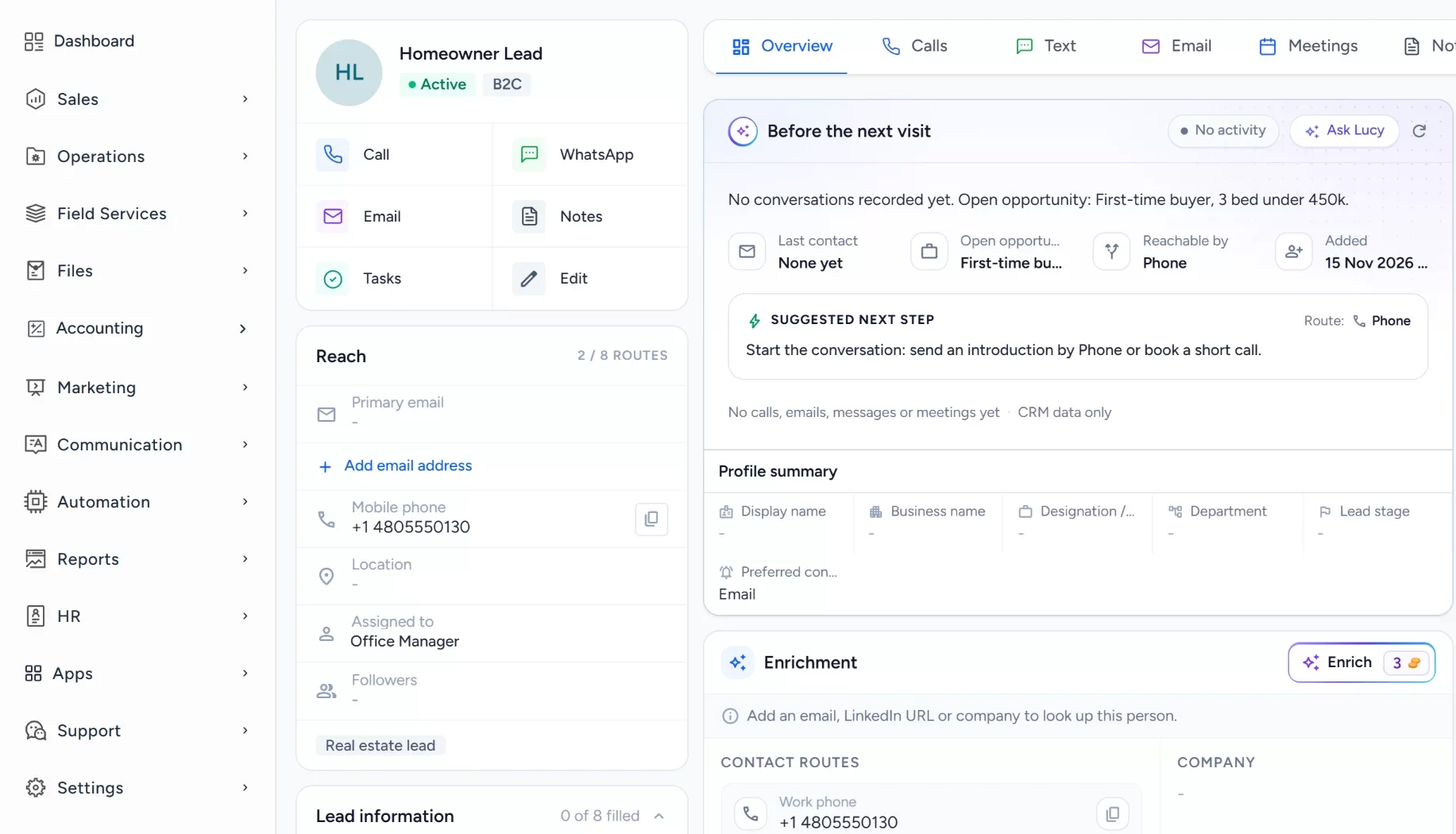
Custom fields hold budget, preferred area and property type, next to notes and the communication history.
Assign each opportunity to an agent
A workflow assigns the new record to an agent and creates a first-contact task, so every buyer has an owner.
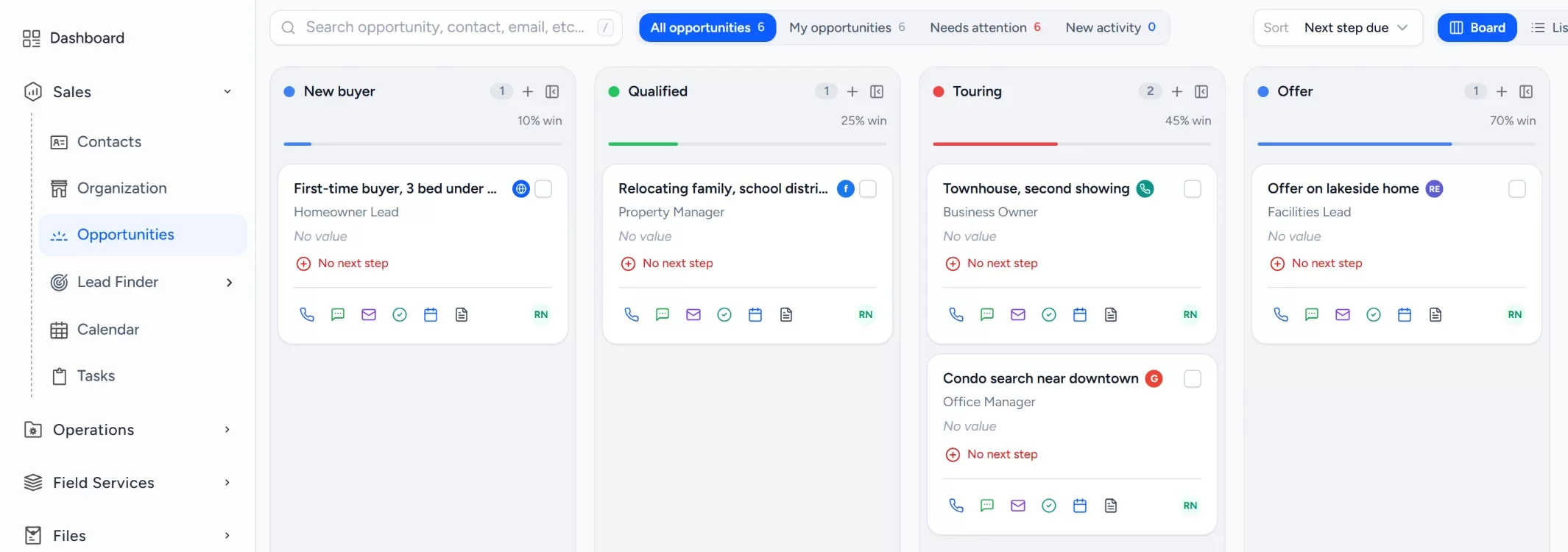
Review active buyers in one pipeline
Stages run from new inquiry to closed, so a team lead can see where each buyer stands.
Book showings from the record
Showings go on the calendar from the buyer record, and notes from each conversation are saved right after.
- Google Calendar
- Outlook
Workflow recipe
Build it in Workflows
When a buyer reaches the showing stage, this workflow creates the showing task for the agent and reminds them a day later if nothing was logged.
When
An Opportunity stage changes to Property showing
Only if
- The Opportunity is in your buyer pipeline
Then
- Assign an owner
- Create a task to confirm the showing time
- Wait one day
- Send an internal notification to the agent if the task is still open
Wait and If/Else steps depend on your plan.
Lucy participation
Where Lucy helps
- TriggerA buyer who attended a showing has had no activity logged afterward.
- ContextLucy reads the buyer's record, notes and logged conversation, within what that agent may open.
- ProposalLucy proposes a follow-up task and a short draft asking for the buyer's impressions.
- ReviewA person reads the draft, edits it and approves it. Anything Lucy drafts for a customer waits for a person to approve it before it leaves.
- LoggedThe approved message and the follow-up task are logged on the record's activity, so the next person sees what was sent.
Before and after
How the process changes
Without the suggested setup
- Inquiries sit in separate forms, inboxes and phones
- Showing requests have no clear handoff
- Agents cannot see each other's conversations
- The broker pieces together who is following up
With the suggested setup
- Inquiries arrive as records with an owner
- Reaching the showing stage creates a task for the agent
- History is logged on the buyer record
- The broker reviews buyers by stage in one pipeline
A comparison of typical processes, not measured results.
How to configure
Set it up in five steps
Add your first records
In Sales > Contacts, add a few buyers with their budget and area, and link one to an Opportunity in Sales > Opportunities.
Configure the lead source
In Sales > Lead Finder > Form Builder, build the request form, then add the Website Form Capture card under Settings > Integrations to put it on your site.
Set the Opportunity pipeline
In Sales > Opportunities, open the pipeline settings and add the stages: New inquiry, Buyer qualified, Property showing, Offer discussion, Under contract, Closed. Add lost reasons for work that is not won.
Set tasks, workflows and the approval policy
In Automation > Workflows, create a workflow on the opportunity stage changed trigger that creates a showing task and assigns the agent. Lucy drafts stay drafts until a person approves them. A plain Send email step in a workflow sends on its own, so use it only for messages you are happy to go out automatically.
Check it with a test run
Open the Dashboard to see the new records, check Communication > Notifications for the task alert, and book a showing in Sales > Calendar and confirm it appears on the buyer record.
Intended benefits
What this setup is designed to improve
Scope. Arches CRM does not replace a property MLS or a transaction management system. It organizes the buyer relationship around them.
- Designed to give agents a shared view of each buyer's needs
- Designed to make every next step have a named owner
- Designed to keep context when a buyer moves between agents
- Designed to let a team lead review all active buyers at once
Screens
What the team sees in Arches
Questions about this workflow
Can Arches CRM replace a listing portal?
No. It manages buyer relationships and inquiries. Listings and MLS functions stay in their own systems.
Can the broker assign agents?
Yes. Opportunities have owners, and roles and permissions control what each user sees.
Can Lucy send property follow-ups itself?
No. Lucy drafts, and anything she drafts for a customer waits for a person to approve it. Only an email step an admin builds into a workflow can send on its own.
Related workflows
Keep long software evaluations organized from demo request to close
Keep long sales conversations organized across every decision maker, with stalled Opportunities flagged for review.Read the guideExplore Arches CRM for Real Estate Agents
The full real estate page: lead capture, pipeline, automation and FAQs.Open the pageBusiness story: Keeping a buyer conversation moving after the first inquiryRead the story
Explore Arches CRM for Real Estate Agents.
Or book a demo and we will walk through this workflow with your own team.Explore Arches CRM for Real Estate Agents Book a demo