
 Log in
 Start Free Trial

Small businesses · Workflow guide
How small businesses can move from spreadsheets to a clear sales process
Small businesses often keep customers in a spreadsheet and quotes in personal inboxes. Import the sheet, build one pipeline from new lead to won, give each quote an owner and a next step, and let the owner review open work on a dashboard.

- Industry
- Small businesses
- Primary challenge
- Spreadsheet contacts without owners
- Arches CRM focus
- Customer inquiries, contact management, sales follow-ups and task organization
Business goals
- Keep every customer in one shared record
- Give each quote an owner and next step
- Let the owner see open sales work
Challenge and proposed solution
When the spreadsheet stops keeping up
Many equipment and installation businesses start by tracking requests in email and a spreadsheet. Once more people join, customers contact several employees and nobody is sure who owns the quote.
Challenge
Spreadsheet contacts have unclear ownership
Arches CRM setup
Import the sheet into shared contact and organization records, each with an owner and a next action.
Someone cleans the spreadsheet columns before the import.
Challenge
Quotes get lost in individual mailboxes
Arches CRM setup
Track each quote as an Opportunity with stages and a linked task, so the next step is on the record.
The quote itself is still prepared in the business's own tool.
Challenge
The owner cannot see pending sales work
Arches CRM setup
Use Opportunities and the Dashboard to review open work and tasks that are due.
The owner decides which items to chase first.
CRM configuration and daily workflow
What the team configures
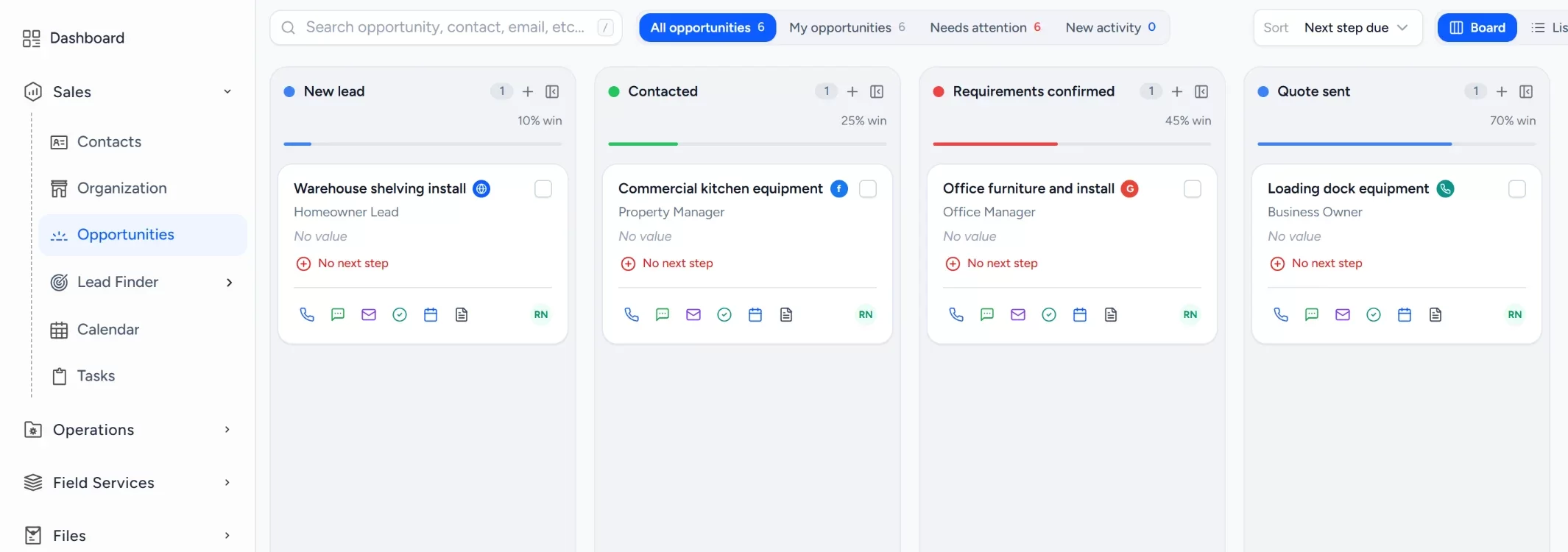
- 1New lead
- 2Contacted
- 3Requirements confirmed
- 4Quote sent
- 5Negotiation
- 6Won or lost
Import the existing spreadsheet
Past leads and customers come in from a CSV file, so the CRM starts with real contacts rather than an empty list.
Keep contacts and companies together
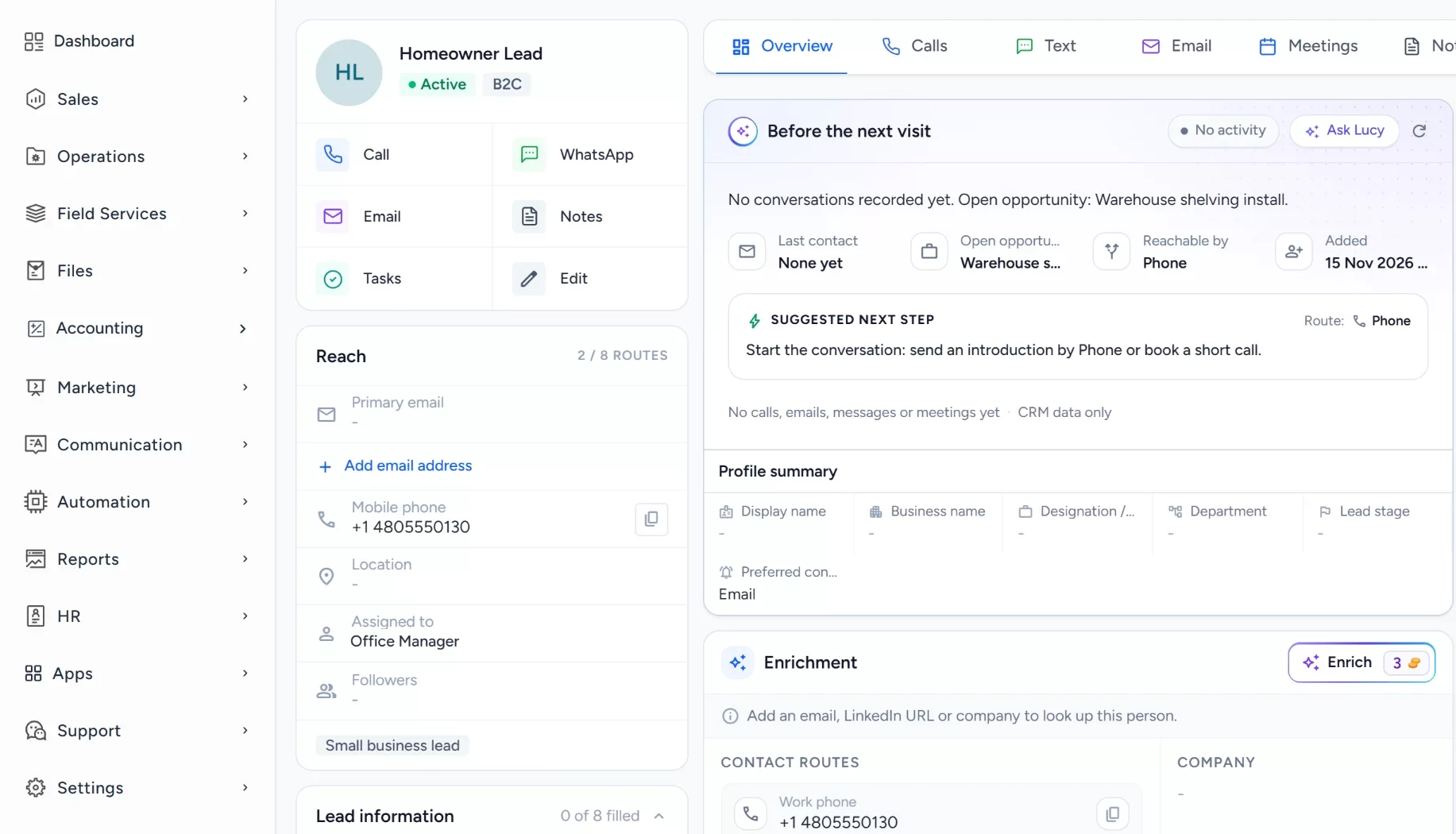
Leads, contacts, companies and activities sit in one workspace instead of separate files.
Build the sales pipeline
Stages run from new lead to won or lost, with lost reasons so the owner can see why work was not booked.
Assign owners and record next steps
A workflow assigns each new lead to an owner and creates a task. Quotes and agreed next steps are noted on the record.
Watch active work on a dashboard
The default dashboard shows the pipeline by stage, replacing the separate spreadsheets that circulate by email.
Workflow recipe
Build it in Workflows
When a customer submits your request form, this workflow gives the inquiry an owner and a first task so no quote request waits in an inbox.
When
A form is submitted
Only if
- The form is your website request form
Then
- Assign an owner
- Create a task to reply and prepare the quote
- Send an internal notification to the owner
Lucy participation
Where Lucy helps
- TriggerA quote has sat in the Quote sent stage with no open task for several days.
- ContextLucy reads the contact, the Opportunity notes and the activity the user is allowed to open.
- ProposalLucy suggests a follow-up task and drafts a short reminder message for the quote.
- ReviewA person reads the draft, edits it and approves it. Anything Lucy drafts for a customer waits for a person to approve it before it leaves.
- LoggedThe approved message and the follow-up task are logged on the record's activity, so the next person sees what was sent.
Before and after
How the process changes
Without the suggested setup
- Customers live in a spreadsheet nobody owns
- Quotes sit in personal mailboxes
- Next steps depend on memory
- The owner asks around to learn what is open
With the suggested setup
- Customers sit in shared records with owners
- Each quote is an Opportunity with a stage
- Every open quote carries a next task
- The owner reviews open work on one dashboard
A comparison of typical processes, not measured results.
How to configure
Set it up in five steps
Add your first records
In Sales > Contacts and Sales > Organization, add a few customers, or bring in a cleaned spreadsheet through Sales > Lead Finder > Import Leads.
Configure the lead source
In Sales > Lead Finder > Import Leads, import the spreadsheet, or use Sales > Lead Finder > Form Builder for a website request form.
Set the Opportunity pipeline
In Sales > Opportunities, open the pipeline settings and add the stages: New lead, Contacted, Requirements confirmed, Quote sent, Negotiation, Won or lost. Add lost reasons for work that is not won.
Set tasks, workflows and the approval policy
In Automation > Workflows, create a workflow on the stage changed or form submitted trigger that creates a task and assigns the owner. Lucy drafts stay as drafts until a person approves them. A plain Send email step in a workflow sends on its own, so use it only for messages you are happy to go out automatically.
Check it with a test run
Open the Dashboard to see the new records, check Communication > Notifications for the task alert, and open an Opportunity to confirm the quote task and owner appear.
Intended benefits
What this setup is designed to improve
Scope. Arches CRM is not accounting, inventory or installation scheduling software. It covers the sales process up to the won customer.
- Designed to let employees work from shared records
- Designed to give the owner a consistent view of the pipeline
- Designed to keep quotes and next steps easy to find
- Designed to improve process visibility, not to promise more sales
Screens
What the team sees in Arches
Questions about this workflow
Does Arches CRM replace an accounting system?
No. It organizes contacts, quotes and sales follow-up. Accounting stays in your current tool.
Can different employees work on the same account?
Yes. Shared records have an owner, and other users see them according to their role and permissions.
Can Lucy find neglected follow-ups?
Lucy can answer questions about records a user is allowed to see, such as open items with no next task. Any message it drafts needs a person's approval.
Related workflows
Keep every buyer inquiry moving from first message to showing
Keep buyer inquiries moving from first contact to the next showing, with an owner on each one.Read the guideExplore Arches CRM for Small Businesses
The full small business page: lead capture, pipeline, automation and FAQs.Open the pageBusiness story: Moving from scattered notes to a sales process everyone can understandRead the story
Explore Arches CRM for Small Businesses.
Or book a demo and we will walk through this workflow with your own team.Explore Arches CRM for Small Businesses Book a demo